We’ve all been there. That sinking feeling when an expensive tool goes missing from a job site, or the sheer frustration of spending an hour hunting for a critical laptop right before a meeting. For many small business owners, it's an all-too-familiar headache.
But what if you could move beyond those outdated spreadsheets and regain control? Modern asset tracking software for small business isn’t some complicated, enterprise-level beast anymore. With intuitive software and the smartphone already in your pocket, effective asset management is more accessible than it's ever been.
Why Asset Tracking Is a Game Changer for Small Businesses
For years, the default for tracking valuable items was a spreadsheet or, for the truly old-school, a pen-and-paper log. While simple on the surface, this approach is a breeding ground for frustration. It's the direct cause of lost equipment, wasted time, and messy, inaccurate records when you need them most for insurance or accounting.
Switching to dedicated software isn't just an upgrade; it’s a fundamental shift in how you operate. Instead of relying on a static, error-prone list, you get a living, breathing database of everything your business owns, right at your fingertips.
Beyond Spreadsheets and Manual Logs
Think about a small construction crew that used to write off several power tools each quarter as a "cost of doing business." By tagging each tool with a simple QR code, they can now check equipment in and out to specific employees. That simple act of accountability can slash accidental loss and theft overnight.
Or consider a marketing agency juggling laptops, projectors, and cameras between team members. An asset tracking system lets them see each device's location, current user, and upcoming maintenance schedule in real-time. No more double-booking equipment for a big client pitch or forgetting to push a critical software update.
Asset tracking is not just about knowing where things are. It’s about making smarter, data-driven decisions that save money, reduce risk, and make your entire operation run smoother. It turns your physical assets into a well-managed part of your business strategy.
An Accessible Solution for Growing Businesses
It wasn't long ago that asset management systems were complex, expensive platforms built exclusively for giant corporations. That's not the world we live in anymore.
The IT asset tracking software market alone is projected to grow at a nearly 9% CAGR between 2024 and 2029, a surge driven largely by small and midsize companies finally getting access to these tools. Features that were once out of reach are now standard in affordable, cloud-based software.
This evolution puts powerful capabilities within reach of almost any budget. Small businesses can now easily implement:
- A centralized asset database: One single source of truth for every piece of gear, from its purchase date to its final day.
- Maintenance scheduling: Get automated reminders for servicing vehicles, calibrating tools, or renewing software licenses.
- Check-in/check-out workflows: Create clear accountability for who has what, dramatically reducing the chance of items "walking away."
- Depreciation tracking: Make accounting and tax prep infinitely easier with accurate, automated asset value calculations.
To get a feel for how modern platforms handle this, you can dig into understanding Freshservice Asset Management capabilities.
This guide will walk you through the practical steps to choose and roll out the right solution for your unique business needs.
Defining What You Really Need from Your Software
Jumping into software demos without a clear plan is like grocery shopping when you're starving. You’ll end up with a cart full of expensive features you don't actually need.
Before you even look at a single product, the most critical step is to figure out what success actually looks like for your business. The goal isn't to find the software with the longest feature list, but the one with the right features to solve your specific headaches.
This whole process starts by asking some tough questions about your assets and your goals. Answering them honestly will give you a clear, actionable checklist to measure every potential software solution against.
Who, What, and Why of Your Asset Tracking Plan
First, let's talk about the "what." Are you tracking high-value electronics like laptops and servers that rarely leave the office? Or are you managing rugged field equipment, such as power tools and surveying gear, that gets tossed in a truck and hauled between job sites every single day? The nature of your assets dictates everything from the durability of the tags you'll need to the importance of a solid mobile app.
Next, get crystal clear on your "why." What's the main pain point you're trying to solve?
- Preventing Loss and Theft: Is your biggest issue things just... disappearing? If so, features like check-in/check-out, user activity logs, and real-time location become your top priorities.
- Streamlining Maintenance: Are you constantly reacting to broken equipment instead of preventing it? You'll need software with maintenance tracking, service history logs, and automated reminders to get ahead.
- Simplifying Audits and Compliance: Do you dread producing asset lists for insurance, accounting, or regulatory purposes? You should be looking for robust reporting, depreciation tracking, and easy data export features.
Finally, think about the "who." Who is going to be using this system day-to-day? Your technicians in the field need a dead-simple mobile app that works offline. An office admin, on the other hand, needs a powerful desktop interface for running reports and managing the big picture. The user experience has to fit the user's role, period.
A freelance photographer managing a handful of expensive cameras and lenses has completely different needs than a small IT firm managing 200 client laptops. The freelancer might just need a simple visual inventory. The IT provider needs detailed service histories, warranty tracking, and asset assignment records.
Building Your Must-Have Feature Checklist
Once you've answered those core questions, you can start translating your needs into a concrete feature list. This becomes your scorecard for evaluating different asset tracking software for small business. Don't get distracted by flashy add-ons; stay focused on the core functions that actually solve your problems.
To help you think through this, we've put together a checklist of common features. Use it to pinpoint what's truly essential for your workflow.
Essential Features Checklist for Asset Tracking Software
Use this checklist to evaluate software options based on your specific business needs, from basic inventory to advanced management.
| Feature Category | What It Does | Who Needs It (Example) |
|---|---|---|
| Asset Tagging & Scanning | Generates and scans QR codes, barcodes, or NFC tags using a mobile device. | Construction Companies needing to quickly identify tools on a job site. |
| Check-in / Check-out | Assigns an asset to a specific person, location, or project with a timestamp. | AV Rental Businesses tracking who has which piece of sound or lighting gear. |
| Mobile App (iOS/Android) | Allows users to access and update asset information from their phones or tablets. | Field Service Technicians who need to log repairs or check out parts in real-time. |
| Maintenance & Service History | Schedules recurring maintenance, logs service events, and tracks costs. | Landscaping Companies managing service schedules for mowers and trimmers. |
| Customizable Reporting | Generates detailed reports on asset depreciation, audit trails, and utilization. | Non-Profits that need to provide asset reports to grant funders or for audits. |
| Alerts & Notifications | Sends automated reminders for warranty expirations, maintenance due, or late returns. | IT Departments tracking software license renewals and hardware warranty end-dates. |
| User Roles & Permissions | Restricts what different users can see or do within the system. | Any business with multiple employees to prevent accidental data deletion. |
| Data Import/Export | Allows you to easily upload existing asset lists and export data to formats like CSV. | Any business migrating from a spreadsheet or another system. |
This checklist isn't exhaustive, but it's a powerful starting point. It forces you to move beyond vague ideas and define exactly what functionality will deliver a return on your investment.
For a deeper dive into the specific tools available, our guide on equipment inventory software provides additional context and examples that can help refine your search.
Think of it this way: a small landscaping company primarily needs to know which employee has which lawnmower and when it was last serviced. Their must-have list would prioritize mobile check-outs and maintenance alerts.
In contrast, a small marketing agency's main concern might be tracking laptops, projectors, and trade show displays. Their list would focus on asset assignment to employees and warranty expiration dates. Creating this focused checklist is the single best way to ensure you choose a tool that fits your workflow perfectly, rather than forcing your workflow to fit some generic piece of software.
Choosing the Right Tagging Method for Your Assets
Once you’ve decided what you’re tracking, the next big question is how. You need a physical way to connect your gear to your digital records. This is where asset tags come in, acting as the bridge between the physical world and your software.
For a small business, this isn't about finding the most high-tech solution. It’s about finding the right balance of cost, durability, and pure convenience. You wouldn’t slap a paper label on a jackhammer, but you also don't need a military-grade tag for a desk lamp. The tag has to fit the asset and its environment.
QR Codes: The Accessible All-Rounder
For most small businesses just getting started, QR codes are the perfect entry point. Why? They’re practically free to generate, and every modern smartphone can scan them instantly. No special hardware, no complicated setup.
Think about a small graphic design agency. They can stick a small QR code on every laptop, monitor, and printer in the office. When a new designer starts, the IT manager just scans the laptop's code with their phone to assign it in the app. It's a fast, clean workflow that costs almost nothing to get up and running.
Here’s where QR codes really shine:
- Best For: Office equipment, electronics, furniture, and indoor tools.
- Pros: Extremely low cost, scannable with any smartphone, and can hold a surprising amount of data.
- Cons: They can get scratched or dirty, which makes them unreadable. They also need a clear line of sight to scan.
The beauty of QR codes is their simplicity. They completely lower the barrier for any small business ready to ditch spreadsheets for a real system, all without a big upfront investment in scanning hardware.
NFC Tags: The Durable Tap-and-Go Option
If your assets work in tougher conditions, Near Field Communication (NFC) tags are a serious upgrade. Instead of aiming a camera, you just tap an NFC-enabled phone near the tag. Done. It's faster and far more reliable, even if the tag is covered in dust or grease.
NFC tags are typically encased in tough plastic or epoxy, making them ideal for harsh environments. Imagine a plumbing business tracking its expensive pipe threaders and inspection cameras. A rugged NFC tag on each tool lets a tech check it out with a quick tap of their phone, even with greasy hands in a dark, damp basement.
Yes, they cost more per tag than QR codes. But for valuable, hard-working equipment, their resilience and speed can pay for themselves in no time.
AI-Powered Photo Recognition: A Modern Approach
A newer option popping up in some platforms is AI-powered photo recognition. Instead of a physical tag, the system uses artificial intelligence to identify an item from a picture. You start by taking photos of an asset from a few different angles to "train" the system.
Later, anyone on your team can just snap a new photo, and the software recognizes the item and pulls up its record. This is a game-changer for things where a tag is impractical or just plain ugly, for instance, unique furniture in a rental property or specific pieces of artwork. While it's incredibly powerful, this tech is still evolving and usually found in more advanced, specialized systems.
When it comes to creating your physical tags, many small businesses use custom labels to add their own branding and essential info.
Ultimately, the best strategy is often a hybrid one. You might use QR codes for your office gear, NFC tags for your field equipment, and maybe photo recognition for a few unique, high-value items. To really nail down your design, it helps to understand the fundamentals of what is an asset tag and how to make it work for you.
A Practical Roadmap for Software Deployment
You’ve picked the right asset tracking software. That’s a huge step, but the real work starts now. A successful rollout is less about the technology you chose and more about how you introduce it to your team and your workflow.
Get this part right, and you'll have a dynamic system that delivers value from day one. Get it wrong, and even the best software can create more chaos than it solves. The key is to avoid a "big bang" launch where everything changes overnight. A phased approach lets you work out the kinks, build momentum, and prove the system is genuinely helping your team, not just adding another task to their plate.
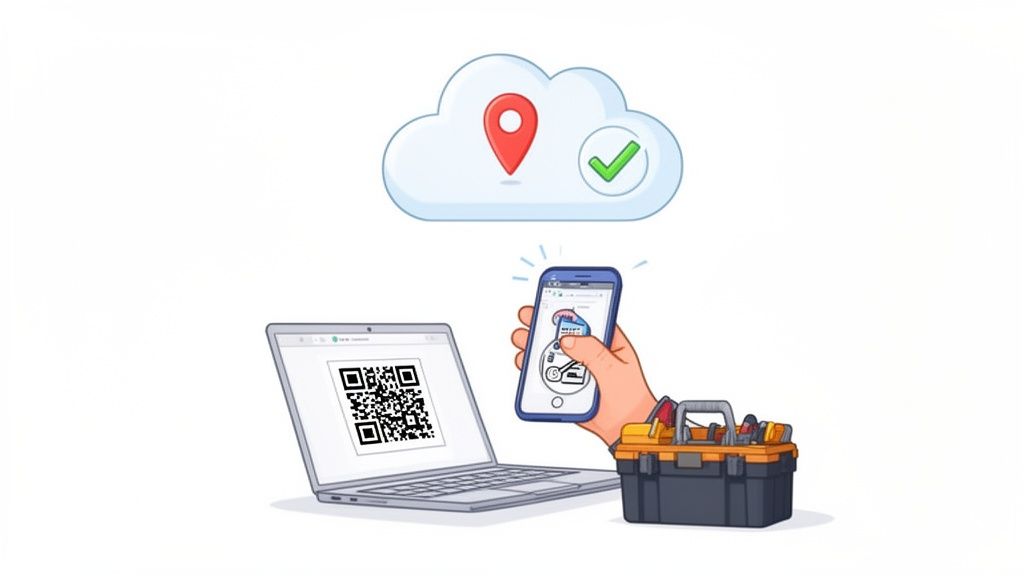
Modern software gives you a few ways to identify and tag your assets, which is the foundation of your entire deployment.
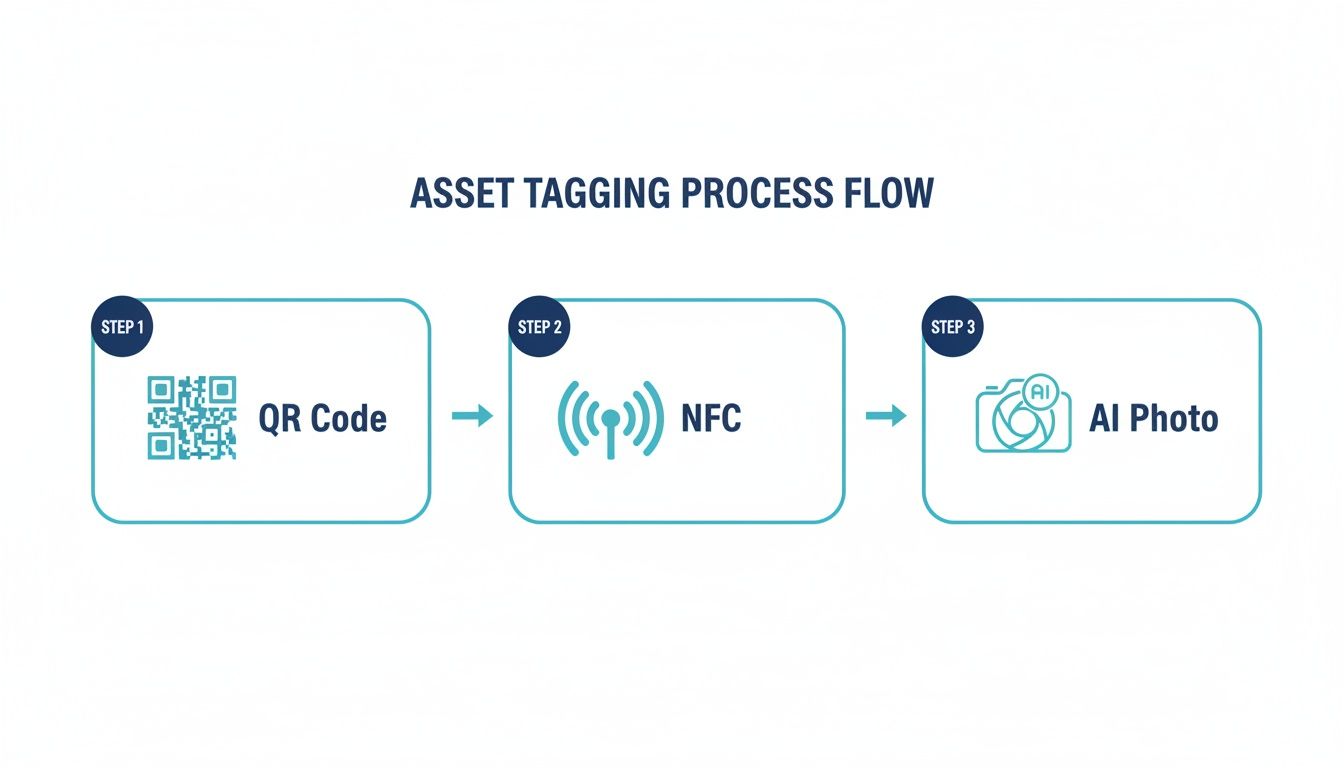
This flow, from simple QR codes to advanced AI photo recognition, shows just how versatile and accessible modern asset tracking has become for businesses of any size.
Kick Things Off with a Pilot Program
Don't try to roll this out to the entire company at once. That's a recipe for headaches. Instead, start small. Pick one department, one location, or even just one specific category of assets for a pilot program.
This controlled test is your chance to get real-world feedback and make adjustments before going all-in.
A construction company, for instance, could start by tracking only the high-value power tools used by a single crew. This lets the crew leader test the mobile app on an actual job site, flag any usability issues, and help you refine the check-in/check-out process. Their feedback is pure gold; it helps create a workflow that makes sense in the field, not just in an office.
Migrate and Clean Up Your Data
Your starting point is most likely that old asset list living in a spreadsheet. Most asset tracking software has a bulk import feature, which is great for uploading a CSV file to get started. But before you do that, see this as the perfect opportunity to clean house.
Seriously, don't just dump your messy spreadsheet into a shiny new system. Take the time to:
- Kill the duplicates: Get rid of any redundant entries for the same exact asset.
- Standardize your naming: Make sure everything is consistent. It should be "Dell Latitude 5420," not a random mix of "Dell Laptop" and "Latitude 5420."
- Fill in the blanks: Add purchase dates, serial numbers, and initial values wherever they're missing.
Clean, accurate data from the get-go prevents a world of pain later and ensures your reports are actually reliable. Remember: garbage in, garbage out.
A successful deployment is less about the technology and more about the people and the process. Focus on making the transition easy for your team, and the tech will naturally fall into place. Your goal is to make their jobs easier, not add another complicated tool to their day.
Connect Your Tools with Integrations
The real power of modern software is its ability to talk to the other tools you already rely on. Integrations are what turn a good tool into a great one by automating tasks, eliminating mind-numbing double-entry, and creating a single source of truth for your business.
For a small business, two integrations are incredibly valuable:
- Accounting Software: Connecting your asset system to a platform like QuickBooks can automate depreciation calculations. When you add a new laptop, its value and purchase date are synced, making tax season significantly less painful.
- Inventory Management System (IMS): If you track both consumable inventory and fixed assets, an integration ensures data flows smoothly between the two. For example, a specialized tool used in production can be tracked as an asset, while the materials it consumes are tracked as inventory.
Establish Simple Team Policies
For any system to work, everyone has to use it the same way, every time. This means you need clear, simple policies that are easy for anyone to follow. Don't write a ten-page manual that no one will read. Create a simple one-page guide that covers the absolute basics.
Your policy should clearly outline:
- Check-in/Check-out: Who is responsible for scanning an asset when they take it or move it?
- Lost or Damaged Items: What’s the immediate process if a tool is broken or a laptop goes missing?
- Using the Mobile App: A quick visual guide on how to do the two or three most common tasks on their phone.
A quick 30-minute training session is usually all it takes to get everyone on the same page. By focusing on a phased rollout, clean data, smart integrations, and simple policies, you’re setting your new asset tracking software for small business up for long-term success.
Figuring Out the Real Cost and ROI of Your System
When you start looking at asset tracking software, it’s tempting to fixate on the monthly subscription price. That's a big piece of the puzzle, for sure, but the real cost of owning a system goes a little deeper. Getting a handle on these numbers upfront isn't just about budgeting; it’s about setting yourself up to see a real return on your investment.
The magic here isn’t just in what you spend; it’s about what you stop losing.
Looking Beyond the Subscription Price
To get the full financial picture, you need to think about both the one-time setup costs and any ongoing expenses. It’s usually pretty straightforward.
Your total investment will probably include:
- Software Subscription: This is your recurring fee, usually monthly or yearly. It’s often tied to how many assets you’re tracking or how many people need access.
- Physical Tags: The cost for QR code labels or tougher NFC tags. Simple QR labels are incredibly cheap, but if you’re tagging equipment for a construction site, you’ll need durable tags that can handle rough environments, and those cost more.
- Training Time: This is the "soft cost" of the time your team needs to get comfortable with the new system. Good software keeps this to a minimum, but it’s still a factor.
The good news? The asset tracking market is exploding. Valued at around USD 23 billion in 2024, it’s on track to more than double by 2030. Cloud platforms and mobile apps are driving this growth, making up over 47% of the market and bringing more affordable, user-friendly tools to small businesses. You can dig into the market dynamics and what they mean for businesses if you're curious.
Measuring Your Return on Investment
Now for the fun part: seeing how this software pays for itself. The return on investment (ROI) isn't just about stopping theft, though that's a huge benefit. It's about getting back all the time your team wastes hunting for equipment and making your whole operation run smoother.
A solid asset tracking system doesn't just cost you money; it makes you money by plugging the hidden financial leaks in your daily operations. The goal is to turn a business expense into a strategic investment.
To calculate your potential ROI, start by looking at what you're currently losing each year. How much time is wasted? What's the value of items that go missing? This is where the software proves its worth.
For some related ideas on maximizing returns, check out our guide to inventory management best practices.
A Real-World ROI Calculation
Let's walk through an example. Picture a small marketing agency with 15 employees. They’re constantly moving expensive gear, such as laptops, projectors, and high-end cameras, between the office, client meetings, and events.
Before getting organized, their annual "ghost costs" looked something like this:
| Annual Cost Category | Description | Estimated Annual Loss |
|---|---|---|
| Lost Laptops | One employee laptop vanishes or gets damaged beyond repair. | $1,500 |
| Missing Projector | A portable projector gets left behind at a conference, never to be seen again. | $600 |
| Wasted Time | Staff spends a collective 2 hours a week searching for shared gear. | $2,600 (at $25/hr) |
| Insurance Premiums | Higher premiums because they lack a formal asset registry. | $300 (excess) |
| Total Annual Loss | $5,000 |
This agency signs up for an asset tracking plan costing $60 per month ($720 per year) and spends another $80 on a batch of durable QR code labels. Their total first-year investment is $800.
After rolling out the system, they completely eliminate equipment loss and slash search time by 90%. Their total annual loss plummets from $5,000 to just $260 (the tiny bit of remaining search time).
This means their net savings in the first year alone is $4,740. Subtract their $800 investment, and the agency walks away with a first-year ROI of $3,940.
When you break it down like that, the decision becomes incredibly simple.
Got Questions? We’ve Got Answers.
Jumping into a dedicated asset tracking system is a big move. Even after you see the benefits, it's totally normal to have a few questions swirling around. Let's tackle some of the most common ones we hear from small business owners who are right where you are now.
How Much Is This Going to Cost Me?
This is usually the first question on everyone's mind, and the answer is probably better than you think. For small businesses, modern cloud-based software is surprisingly affordable.
You’ll typically find solid entry-level plans starting around $20 to $50 a month. These usually cover a set number of assets and users. If you need more advanced features like maintenance scheduling or custom reports, you might be looking at a range of $50 to $200+ per month. The price is almost always tied to how many assets you’re tracking or how many people need to use the system.
It's a common myth that asset tracking is a major business expense. The reality? For most small businesses, the monthly cost is less than the price of replacing a single lost tool or piece of equipment. You'll likely see the return on investment in just the first few months.
Don't forget to factor in the small, one-time cost of the tags themselves. Simple QR code labels can be printed for pennies, while more durable options like NFC tags might run you a few dollars each. Our advice? Always take advantage of free trials to make sure the software feels right before you commit.
Can We Just Use Our Phones for This?
Absolutely. In fact, this is one of the biggest game-changers. The days of needing clunky, expensive, dedicated barcode scanners are over. Your team's smartphones are all the hardware you need.
Any reputable asset tracking platform will have a great mobile app for both iOS and Android. These apps use the phone’s camera to scan QR codes and barcodes in a snap. Many also support NFC, which means you can just tap your phone against a tag to instantly pull up all the details on an asset.
This makes getting started incredibly easy. Your crew can update asset information on the spot, whether they're in the office, on a job site, or out with a client. It's this mobility that keeps your data accurate and your system alive.
What's the Difference Between Asset Tracking and Inventory Management?
This is a crucial distinction. Getting it right means you'll pick software that actually solves your problem. People often use these terms interchangeably, but they handle two very different parts of a business.
Inventory Management: This is all about tracking things you plan to sell or use up. Think raw materials, products on a shelf, or office supplies. The goal is to manage stock levels so you don't run out and can keep up with customer demand.
Asset Tracking: This is for managing the stuff your business owns and uses to operate. We're talking about your computers, company vehicles, power tools, and office furniture. The goal here is to know where your stuff is, who has it, what condition it's in, and when it needs maintenance, all to prevent loss and get the most life out of it.
While some massive enterprise systems might do both, most software for small businesses specializes in one or the other. Knowing which one you need will narrow your search immediately.
How Long Does It Realistically Take to Get Started?
For a small business, this is a surprisingly quick process. You’re not signing up for a months-long headache. If you have fewer than 100 assets, you can be completely up and running in a week, sometimes even less.
Here’s what that timeline usually looks like:
Setting Up Your Account: This is fast, maybe an hour or two. You’ll configure your settings, customize a few data fields, and invite your team members.
Getting Your Data In: Have an asset list on a spreadsheet? You can usually import it in under an hour. This is also a great chance to clean up old data and start fresh.
Tagging Everything: This is the most hands-on part. Applying all the QR code labels or NFC tags can take anywhere from a few hours to a couple of days, depending on how many items you have and where they're located.
Training the Team: Modern apps are built to be intuitive. A single 30 to 60-minute training session is usually all it takes to get everyone comfortable checking items in and out with their phones.
If you have hundreds of assets or a more complicated workflow, it might take a couple of weeks. A great strategy is to start with a pilot program in just one department. You can work out the kinks on a small scale before rolling it out to the whole company, which makes for a much smoother transition for everyone.
Ready to stop searching and start organizing? With Vorby, you can effortlessly catalog everything you own, from household items to small business assets. Use our AI-powered photo recognition and intuitive tagging to create a complete visual inventory. Find what you need in seconds and manage it all from one place. Start your free 14-day trial today and see how simple organization can be. Visit us at https://vorby.com to learn more.