For small businesses, picking the best inventory tracking software feels like a high-stakes decision. The right tool needs to be powerful enough to handle real-world complexity but affordable enough not to break the bank. It's why names like Zoho Inventory, inFlow, and Cin7 Core constantly come up; they go way beyond simple spreadsheets. We're talking real-time stock counts, multi-channel sync, and automated reordering that prevents costly mistakes and actually helps you grow.
Why Manual Inventory Tracking Is Costing Your Business

If you're still running your business on spreadsheets, you're not alone. For a lot of small business owners, it feels practical, even thrifty. But this approach has steep, hidden costs that are silently eating away at your profits and holding you back. All those hours spent on manual counts, cross-referencing sales slips, and fixing simple human errors? That’s time you could be investing in actually growing your business.
This inefficiency leads directly to the two biggest inventory nightmares: stockouts and overstocking. A stockout isn't just one lost sale; it's a crack in customer loyalty that can send them straight to your competition. On the flip side, overstocking ties up precious cash in products that are just collecting dust, driving up storage costs and risking obsolescence.
The True Price of Inaccuracy
Sloppy inventory management can hit a business hard. Some estimates show it can slash annual revenue by a staggering 8-12%. This isn't just about the money you're losing; it's about the opportunities you miss when you don't have a clear, real-time picture of your assets. Making strategic decisions becomes a total guessing game when you don't know exactly what you have or where it is.
Thankfully, modern cloud-based software has made powerful inventory control accessible and affordable for everyone. Think of it as a central nervous system for your entire operation, a single source of truth connecting sales, purchasing, and fulfillment. This shift turns inventory from a logistical headache into a strategic weapon.
"By putting inventory data into a unified system, you gain reliable insights and build scalable workflows. This allows you to stay focused on strategy instead of getting bogged down by manual updates and spreadsheets."
Just like manual inventory tracking is a costly time-sink, inefficient accounts payable processes can drain your resources, too. If you're curious how automation can help other parts of your business, it's worth checking out the best AP automation software for small business.
From Reactive Fixes to Proactive Growth
At the end of the day, dedicated software is an investment in stability and growth. By automating the grunt work and serving up accurate data, these platforms empower you to:
- Prevent Lost Sales: Get automated low-stock alerts so you can reorder popular items before they run out.
- Optimize Cash Flow: Use data-driven forecasting to stop tying up money in products that barely move.
- Improve Customer Loyalty: Accurate stock info and faster fulfillment create happy, repeat customers.
Picking the right tool is your first step toward running a tighter ship. You can get a solid foundation by reviewing key inventory management best practices. This guide will help you compare solutions that tackle these common pain points head-on.
How to Evaluate Inventory Software for Your Needs
Choosing the right inventory tracking software for your small business means looking past the flashy feature lists and focusing on what will actually make a difference in your day-to-day. The best system should feel like a natural extension of your operations, not a complicated puzzle you have to solve every morning. You're looking for a tool that fixes your specific problems, whether that’s stopping stockouts, making fulfillment less chaotic, or just getting a clearer picture of your finances.
To do that, you need a practical way to judge what you're seeing. Let's get beyond the marketing jargon and look at how key features translate into real-world benefits. This will help you build a personalized checklist to evaluate any software with confidence.
Core Features and Their Real-World Impact
Every software provider will promise to organize your stock, but the details are what really matter. For most growing businesses, a few features are non-negotiable because they directly prevent the most expensive inventory mistakes. Think of these as the foundation of any system worth your money.
Here are the absolute essentials to look for:
- Barcode and QR Code Scanning: This isn't just about the satisfying beep of a scanner; it’s about stamping out costly human error. Manually typing in product codes when a shipment arrives or when you're picking an order is slow and a recipe for mistakes. A quick scan guarantees accuracy, speeds up fulfillment, and gives you a precise, real-time count of every item. For a deeper dive on this, check out our guide on using a barcode scanner for inventory management.
- Automated Reorder Points: This feature is your safety net against the dreaded "out of stock" notification. Instead of guessing when it's time to reorder, you set a minimum stock level for each product. When your inventory dips below that line, the system automatically alerts you or even drafts a purchase order. It’s how you make sure you never miss a sale because a shelf went empty.
- Multi-Location Management: If you're selling from a retail shop, a warehouse, and online, you absolutely need a single source of truth for your stock levels. Multi-location management syncs your inventory across every channel in real time. This stops you from selling an item on Shopify that just walked out the door of your physical store, protecting your reputation and keeping customers happy.
Advanced Capabilities for Strategic Growth
Once the basics are covered, you can start looking at the features that help you move from simply managing inventory to optimizing it for profit. These tools provide the insights you need for smarter purchasing, better cash flow, and operations that can actually scale with you. This is what separates the good software from the great stuff.
By getting all your inventory data into one unified system, you start getting reliable insights and building workflows that can grow. It allows you to stay focused on strategy instead of getting bogged down by manual updates and messy spreadsheets.
Think about how these more advanced functions could push your business forward:
- Purchase Order (PO) Generation: Manually creating purchase orders is a tedious, repetitive chore. Good software automates this by turning those low-stock alerts into professional POs you can send directly to suppliers from inside the platform. It saves a ton of admin time and creates a clean, traceable record of every single order you place.
- Demand Forecasting and Reporting: This is where your own sales data starts working for you. The best inventory software analyzes your sales history to spot trends, predict future demand, and shine a light on your top-performing products. These reports give you the power to make data-driven buying decisions, so you can stop overstocking on slow-movers and capitalize on what's hot.
- Key Software Integrations: Your inventory system can't live on an island. It needs to talk to the other tools you depend on every day. The most critical connection is usually with accounting software like QuickBooks or Xero, which automates the flow of financial data and makes bookkeeping way less painful. For anyone selling across multiple channels, e-commerce integrations with platforms like Shopify or Amazon are just as essential.
Before we move on, it's helpful to see these features laid out in a clear, practical way. This table breaks down what these essential tools do and, more importantly, what they mean for your bottom line.
Essential Inventory Software Features and Their Business Impact
| Feature | What It Does | Why It's Critical for Your Small Business |
|---|---|---|
| Real-Time Tracking | Updates stock levels instantly across all sales channels as items are sold, received, or moved. | Prevents overselling, reduces the risk of stockouts, and gives you an accurate, up-to-the-minute view of your assets. |
| Barcode/QR Scanning | Uses scanners to quickly and accurately identify products for receiving, picking, and cycle counts. | Drastically reduces human error from manual entry, speeds up warehouse operations, and improves inventory accuracy to over 99%. |
| Automated Reordering | Sets minimum stock thresholds (reorder points) that automatically trigger alerts or create purchase orders. | Acts as your safety net against stockouts, improves cash flow by preventing over-ordering, and frees up your time from manual checks. |
| Multi-Location Sync | Consolidates inventory data from multiple warehouses, retail stores, or online marketplaces into one view. | Provides a single source of truth, enabling efficient order fulfillment and preventing channel-specific stock issues. |
| Reporting & Analytics | Generates reports on sales velocity, inventory turnover, stock aging, and profitability per product. | Turns your raw data into actionable insights for smarter purchasing, better marketing, and identifying your most valuable products. |
| Key Integrations | Connects seamlessly with your e-commerce platform (Shopify), accounting software (QuickBooks), and shippers. | Creates a smooth, automated workflow, eliminates double-data entry, and ensures all your business systems are in sync. |
Seeing it this way helps clarify which features are "nice-to-haves" and which ones are foundational to building a more efficient and profitable business.
The global inventory management software market is blowing up for a good reason. It’s projected to hit $2.38 billion in 2025 and is expected to surge to a massive $8.48 billion by 2035. Small businesses are a huge driver of this growth, as more owners adopt these tools to slash carrying costs by up to 20-30% through smarter forecasting and automated replenishment. The software side is growing at a 14.0% CAGR, mostly because cloud integrations with e-commerce giants make it so much easier for small shops to scale. You can learn more about these inventory management software market trends from Future Market Insights.
A Head-To-Head Comparison of Top Inventory Solutions
Trying to pick the right inventory tracking software can feel like you're drowning in options. Every platform promises to solve all your problems, but the truth is, the best tool for an online retailer is often a terrible fit for a small manufacturer. The secret is to ignore the generic feature lists and focus on how each solution works in the real world, for a business just like yours.
This comparison cuts through the noise. We're breaking down the top contenders, including Zoho Inventory, inFlow, and Cin7 Core, not just by what they do, but by who they do it for. We’ll frame each one around a specific business model to help you match a platform’s unique strengths to your actual day-to-day challenges.
This decision tree can give you a quick gut check on what type of software you should be looking for.
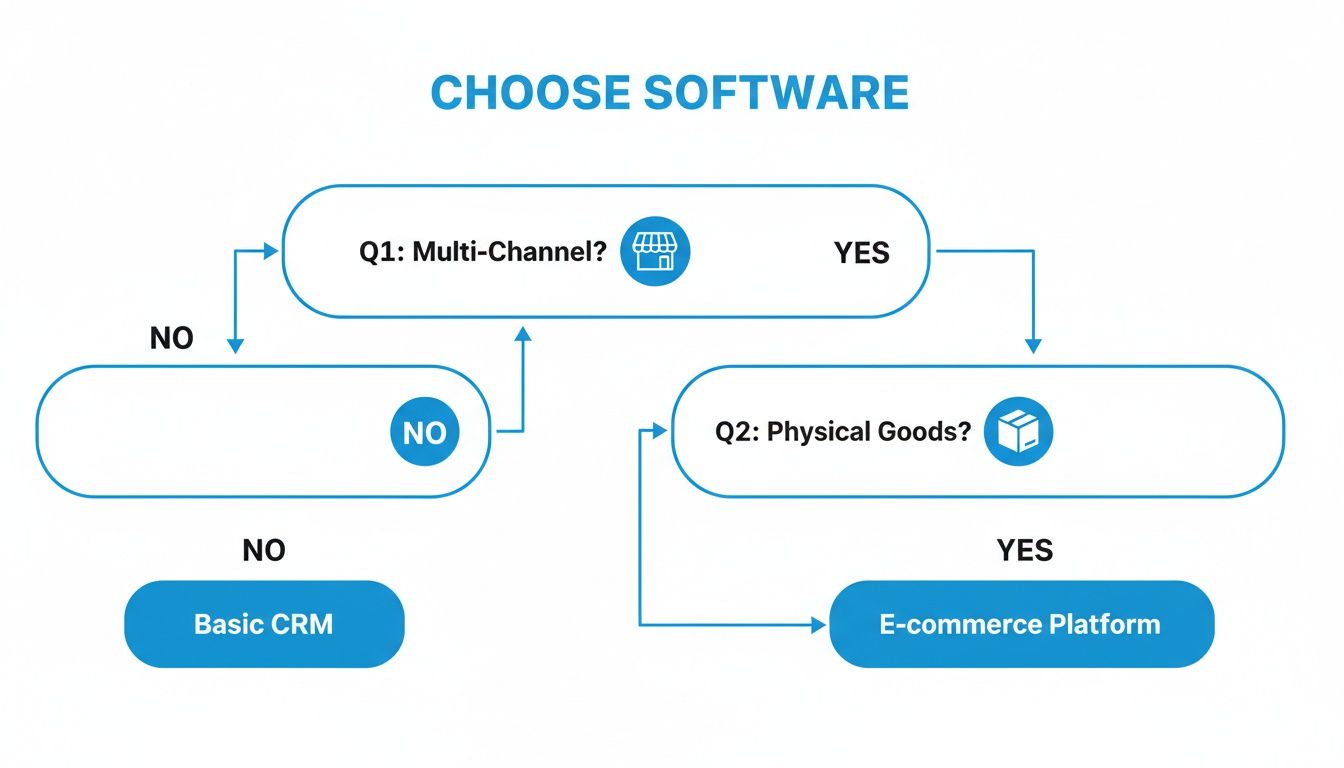
As the flowchart shows, once you start selling across multiple channels or dealing with physical products, your needs get a lot more complex than a simple, single-channel operation.
Zoho Inventory: Best For Multi-Channel E-commerce Startups
If you're a small business juggling sales across online marketplaces like Amazon, eBay, and your own Shopify store, Zoho Inventory should be high on your list. Its biggest advantage is how beautifully it plugs into the wider Zoho ecosystem, especially Zoho Books and Zoho CRM. This creates a single, unified command center for your sales, customer data, and finances without needing a bunch of clunky, third-party connectors.
Picture this: you run an online boutique selling handmade goods on Etsy and your own website. When a product sells on Etsy, Zoho instantly syncs your stock levels across every channel. That means the quantity on your Shopify store updates in real-time, stopping you from accidentally overselling an item. This kind of centralized control is gold for protecting your seller reputation and avoiding those awkward "sorry, it's out of stock" emails.
The mobile app is also a game-changer for owners who are always on the move. You can check inventory, manage orders, and even create purchase orders right from your phone while you're at a trade show or meeting with a supplier. It's a genuinely practical tool for lean, fast-moving teams.
Key Differentiator: Zoho Inventory’s native integration with the massive Zoho suite gives you an all-in-one business hub that few can compete with at this price point. It’s perfect for startups that want to build on an interconnected tech stack from day one.
The platform also takes a huge load off your shoulders with its order management. It automates fulfillment workflows, from printing packing slips and shipping labels to sending tracking updates to customers. This automation buys back countless hours you'd otherwise spend on manual admin, freeing you up to focus on growing the business. For a startup, that isn't just a convenience; it's a lifeline.
inFlow: Best For Wholesalers And Distributors
While a lot of software focuses on selling directly to consumers, inFlow has carved out a smart niche by catering specifically to wholesalers, distributors, and B2B businesses. Its features are built from the ground up to handle the unique headaches of bulk orders, tiered pricing, and showroom sales. If you sell to other businesses, inFlow speaks your language.
Let's say you're a small distributor of specialty coffee beans supplying local cafes. With inFlow, you can create custom price lists for each client. The big chain gets its volume discount, while the small independent shop pays the standard rate, and the software handles it all automatically. No more double-checking spreadsheets or manually adjusting invoices.
Even better is inFlow's B2B Portal. It’s essentially a private, password-protected online storefront where your clients can log in, see their specific pricing, and place orders themselves. This self-service portal makes reordering a breeze for them and dramatically cuts down on your team's administrative work. It gives your B2B operation a polished, e-commerce feel without the custom development cost.
Another standout is its powerful serial number tracking. If you deal in electronics or other high-value goods, being able to track an individual item from the moment it arrives to the moment it sells is critical for managing warranties and preventing theft. InFlow makes this process simple, which is a feature often missing from more retail-focused platforms.
Cin7 Core: Best For Light Manufacturing And Product Bundling
Cin7 Core (you might know it by its old name, DEAR Systems) shines where most small business platforms stumble: light manufacturing and assembly. If your business creates finished products from raw materials or bundles multiple items into kits, Cin7 Core gives you the tools for precise cost tracking and production management. It delivers the kind of operational depth you'd normally only find in expensive Enterprise Resource Planning (ERP) systems.
For instance, if you sell gift baskets, you need to track the finished baskets and the individual items inside, like the gourmet chocolates, the crackers, and the wine. Cin7 Core's bill of materials (BOM) feature lets you define these recipes. When you assemble a new batch of baskets, the system automatically deducts the components from your raw materials inventory and adds the finished goods to your sellable stock.
This is also a huge help for calculating your true cost of goods sold (COGS). The software totals the cost of all the components, plus any labor or overhead, to give you a crystal-clear picture of your profit margin on every single item. That kind of data is crucial for making smart pricing decisions.
Key Differentiator: Cin7 Core’s sophisticated bill of materials and assembly features give small manufacturers the power of an ERP at a fraction of the cost. It enables precise tracking of raw materials, work-in-progress, and finished goods.
Beyond manufacturing, Cin7 Core also has strong multi-channel integrations with major e-commerce platforms, B2B portals, and POS systems. This makes it a great fit for hybrid businesses that might sell their manufactured goods both online and through wholesale channels. If you're still weighing your options, this guide on the 12 Best Inventory Management Tools for Small Business offers a great wider perspective.
Software Feature Comparison for Small Businesses
Choosing the right tool comes down to matching its strengths to your specific needs. This table offers a quick, at-a-glance look at how our top picks stack up against each other on the features that matter most.
| Software | Best For | Multi-Channel Sync | Kitting/Bundling | Reporting Level | Starting Price |
|---|---|---|---|---|---|
| Zoho Inventory | E-commerce Startups | Excellent (Shopify, Amazon, Etsy) | Basic | Intermediate | Free plan available |
| inFlow | Wholesalers & B2B | Good (B2B Portal focus) | Standard | Advanced | ~$99/month |
| Cin7 Core | Light Manufacturing | Excellent (POS & E-commerce) | Advanced (Bill of Materials) | Expert | ~$325/month |
This side-by-side view really highlights the unique sweet spot for each platform. Zoho’s generous free plan and top-tier e-commerce integrations make it a no-brainer for startups. In contrast, inFlow’s specialized B2B toolkit serves a completely different type of business. And while Cin7 Core is the priciest, its manufacturing features are in a league of their own, making the cost well worth it for any business that assembles its own products. The right choice for you depends entirely on which of these profiles looks the most like your own.
Planning Your Migration to a New Inventory System
Making the leap from a trusty spreadsheet to a dedicated inventory platform is a huge moment for any small business. It’s exciting. While the payoff is massive, the transition itself needs a solid game plan to avoid disrupting your entire operation. A rushed implementation can create more headaches than it solves, so a methodical, step-by-step approach is the only way to go.
The whole process kicks off not with the software, but with your data. Seriously. Messy, inconsistent, and incomplete product information is the #1 killer of a smooth migration. Before you even think about importing a single item, you have to clean house.
This is the tedious-but-critical work of standardizing your SKUs, fixing typos in product names, and making sure every single item has a clear unit of measure. It’s grunt work, no doubt, but it lays the foundation for an accurate, reliable system that you can actually trust. A clean dataset prevents a thousand tiny errors from spiraling out of control later.
Executing a Flawless Launch
With your data squeaky clean, it's time to connect that digital information to the physical world and get the software dialed in to your workflow. This is where the planning turns into action. A well-orchestrated launch ensures you start with dead-on stock levels and a system that actually works for your team.
A successful launch really boils down to three key moves:
- Conduct a Full Physical Stocktake: Before you go live, you have to count every single item you own. This isn't optional. This physical count becomes the absolute source of truth for your new system, guaranteeing your opening balances match what's sitting on your shelves.
- Import Your Clean Data: With the count done, you can now import your pristine product data into the new platform. Most software provides templates to make this easier, but trust me on this: always run a test import with a small batch of items first to catch any formatting quirks.
- Configure Key Integrations: Now, connect your inventory software to the other tools that run your business. The priorities are almost always your e-commerce platform (like Shopify) and your accounting software (like QuickBooks). This creates that seamless flow of sales and financial data you've been dreaming of.
Setting Your Team Up for Success
Even the best inventory tracking software for small business will fall flat if your team doesn't understand how to use it. Proper training and crystal-clear roles are just as vital as the technology itself. A system that only one person "gets" is a bottleneck waiting to happen.
You need to focus on role-specific training. Your warehouse crew needs hands-on time with barcode scanners and the receiving process. Your purchasing manager, on the other hand, needs to master running sales reports and creating purchase orders. This targeted approach makes the training relevant and way more effective. For businesses with specialized gear, we've got more tips in our guide to equipment inventory software.
A successful software migration is 20% technology and 80% process and people. Investing time in data cleanup and team training guarantees a smoother transition and a much faster return on your investment.
Finally, set up user roles and permissions from day one. Not everyone needs access to everything. Limiting access based on job function protects your data, slashes the risk of accidental errors, and helps each person focus on the tasks that matter to them. This simple, structured approach keeps your system clean and accurate as your business grows.
When Your Business is Your Hobby (Or Vice Versa)

The big-name inventory platforms are fantastic for businesses focused on sales. But let's be honest, they’re overkill for a lot of micro-businesses and home-based operations where the goal isn't just moving product.
When your "inventory" is actually your personal assets, creative supplies, or valuable equipment, the game changes. A hobbyist drowning in craft supplies doesn't need a purchase order workflow. A collector trying to keep track of valuable items with warranties and manuals needs something completely different from a multi-channel retailer.
This is where a different mindset, centered on home inventory management, makes a lot more sense.
When Your Assets Are Your Business
For many solo entrepreneurs, the tools of the trade are the most critical assets. Think of a freelance photographer with thousands of dollars in lenses and lighting gear, or a woodworker with a shop full of specialized power tools. Tracking these items isn't about sales velocity; it’s about knowing what you have, where it is, and its condition.
A home-focused service like Vorby is built for these exact scenarios. It shifts the entire focus from sales and suppliers to personal asset management, answering practical, everyday questions without the noise of commercial software.
For home-based ventures and collectors, the best inventory software isn't about managing sales channels. It's about creating a personal, searchable catalog of your physical stuff to protect its value and get organized.
Instead of tracking SKUs, you're tracking warranties, purchase dates, and user manuals for every piece of gear. This makes it a perfect fit for managing the operational side of a micro-business or a serious hobby.
Smart Features for Personal and Micro-Inventories
The real difference is in the technology. While commercial platforms pour resources into e-commerce integrations, a tool like Vorby uses AI for more personal, practical applications. Its AI-powered item recognition, for instance, can identify an object from a simple photo and log it into your inventory, saving you from tedious manual entry.
This kind of tech is incredibly useful for a few specific situations:
- Mapping Your Physical Storage: You can generate and stick QR codes on storage bins, shelves, or even entire rooms. A quick scan with your phone instantly shows you what’s inside, so you can stop digging through boxes.
- Searching Like a Human: The natural language search lets you find things by just asking a question, like, "Where are my spare ink cartridges?" The system pinpoints the exact location, saving a ton of time and frustration.
- Documenting Your Valuables: For collectors, being able to upload photos, receipts, and appraisal documents for each item creates a secure, organized record for insurance claims or estate planning.
These tools were built for the unique challenges of managing a personal or micro-business inventory. While commercial software is driven by e-commerce, 55% of SMBs have adopted tracking software to handle the explosion of SKUs in an online market that hit $6.3 trillion in 2024. This trend highlights just how crucial asset tracking is, a practice where 73% of businesses report better cash flow. Just as Vorby helps a collector manage warranties, these tools help larger businesses optimize their resources. You can read more about the growth of inventory management software from Research and Markets.
Common Questions About Inventory Software
Diving into inventory management software can feel like learning a new language. As you get closer to making a decision, a bunch of practical questions always pop up, everything from cost to how you'll actually get it running.
Let’s tackle some of the most common questions we hear from small business owners. My goal here is to give you straight, clear answers to help you lock in your choice with confidence.
How Much Should I Expect to Pay for Inventory Software?
This is the big one, and the honest answer is: it varies a lot. The price of inventory software is almost always tied to your usage. Think of it like a utility bill; the more you use, the more you pay. Key factors include how many people on your team need access (users), your monthly order volume, and how many unique products (SKUs) you manage.
For a small business just getting started, entry-level plans often hover around $50 per month. These usually cover the core features like stock tracking and basic reporting. As your needs grow, especially if you need to manage multiple warehouses or have light manufacturing features, you can expect to pay anywhere from $150 to over $500 monthly.
Most platforms use a tiered model, which is actually a good thing. It means the software can scale with you. Just be sure to double-check the fine print on order and user limits before you sign up to avoid any surprise charges down the road.
Can I Use Barcode Scanners with These Solutions?
Yes, and you absolutely should. Any modern inventory software worth its salt is built to work seamlessly with both USB and Bluetooth barcode scanners. This isn't just a "nice-to-have" feature; it's fundamental for any business that's serious about accuracy and speed.
Think about all the places mistakes happen: receiving stock, counting inventory, and picking and packing orders. Barcode scanning drastically cuts down on human error in all these areas and makes everything happen so much faster. Many platforms even offer mobile apps that let you use your smartphone's camera as a scanner, which is a fantastic, low-cost way to get your team up and running.
A common mistake is assuming you're ready for software just because you're busy. The real signal is when spreadsheets start causing more problems than they solve, such as stockouts, overselling, and hours wasted on manual updates. If poor inventory control is actively limiting your growth, it's time to upgrade.
What Is the Difference Between Inventory and Asset Tracking?
This is a crucial distinction that trips a lot of people up. They sound similar, but they serve two totally different purposes.
Inventory tracking is purely for the stuff you sell. Its entire reason for being is to help you monitor stock levels, figure out when to reorder, and analyze sales data so you can be more profitable.
Asset tracking, on the other hand, is for the stuff your business owns and uses to operate. We're talking about computers, company vehicles, tools, and machinery. While some inventory platforms have a few basic asset features tacked on, a dedicated asset management system is what you need if you have to track things like depreciation, maintenance schedules, or who has what piece of equipment checked out.
How Do I Know When to Switch from a Spreadsheet?
The moment you're ready to throw your computer out the window because of a spreadsheet is the moment you should have switched. Joking aside, it’s less about hitting a certain number of products and more about the daily pain points you’re feeling.
Here are the classic telltale signs that your spreadsheet has run its course:
- You're constantly putting out fires. You’re either sold out of your best-sellers or you’ve got a mountain of cash tied up in products that just won't move.
- You sell on more than one channel. Trying to keep stock levels synced across your website, Etsy, and Amazon with a spreadsheet is a recipe for overselling and disappointing customers.
- Your team is wasting time. If someone is spending hours every week just updating numbers, fixing typos, and trying to make sense of the data, that’s time (and money) you’re not getting back.
- Mistakes are costing you money. Bad data leads to bad purchasing decisions. If your spreadsheet is causing you to order the wrong things at the wrong time, it's directly hurting your bottom line.
If any of that sounds painfully familiar, you've officially graduated from spreadsheet university. It's time to upgrade.
Ready to stop guessing and start organizing? Vorby uses AI-powered tools to help you create a searchable, visual catalog of everything you own. Map your physical spaces with QR codes, find items with natural language search, and finally get your home or micro-business inventory under control. Start your free 14-day trial at https://vorby.com.