Ever feel like you have a smart assistant for your life, but not for your stuff? Imagine one for your pantry and closets, something that always knows what you have, where it is, and when you're about to run out. That’s the simple promise of automatic inventory management for your home. It’s all about swapping out those half-forgotten lists and frantic searches for a smart system that tracks your belongings for you.
What Is Automatic Inventory Management for Your Home?
At its core, automatic inventory management is the big shift from trying to remember what you own to letting technology handle the tracking. This isn't some brand-new, futuristic concept; businesses have been using it for ages to manage massive warehouses. The exciting part is that it's finally simple and accessible enough for our own homes. Instead of a pen-and-paper list or a clunky spreadsheet you never update, you get a living, breathing catalog of your household items.
This means knowing exactly how many AA batteries are in that junk drawer, where you stashed the holiday lights, or if you’re down to your last bottle of olive oil, all with a quick glance at an app. The goal here is simple: bring some order to the chaos and get rid of those small, daily frustrations of hunting for misplaced things or buying duplicates you didn't need. These systems are built on the same principles that power many home automation systems, all designed to make daily life a little bit smoother.
Moving Beyond Manual Methods
For years, the only way to get a grip on our stuff was through sheer, tedious effort. You might have tried a spreadsheet, a shared note, or even a whiteboard on the fridge. And while the intention was good, these methods all share the same fatal flaws, the very problems an automatic system is built to solve.
- It’s just too easy to make mistakes. Forgetting to log that bottle of ketchup you just opened or the new lightbulbs you bought is inevitable. Over time, your inventory becomes completely unreliable.
- The updates are a total chore. Manually typing in every single grocery item or new purchase is a task that nobody sticks with for long. It’s boring, and life gets in the way.
- They offer zero real-time help. A manual list can't tap you on the shoulder when you're running low on coffee. You only find out you're out of something right when you need it most.
An automatic system is designed to leapfrog these hurdles. By using smart features like receipt scanning and image recognition, it practically eliminates manual data entry. The tech does the heavy lifting, making sure your inventory stays accurate and actually useful. You can see how this works in practice in our guide to home inventory management software.
Why Automation Is Finally Catching On
The move toward automation isn't just about big business logistics; it reflects a broader desire for a more efficient, less stressful life. The numbers tell the same story. The global inventory management software market, valued at USD 2.38 billion in 2025, is expected to skyrocket to USD 8.48 billion by 2035. This boom is fueled by a demand for the kind of real-time tracking and accuracy that are just as valuable in a pantry as they are in a warehouse.
So, how big is the difference, really? Let's break it down.
Manual vs Automatic Home Inventory: A Quick Comparison
When you put the old-school spreadsheet method side-by-side with a modern smart app, the contrast is stark. One relies on constant manual labor, while the other leverages technology to do the work for you.
| Feature | Manual Method (e.g., Spreadsheet) | Automatic Method (e.g., Smart App) |
|---|---|---|
| Data Entry | Completely manual; requires typing every item | Mostly automated; uses camera, receipts, and AI |
| Accuracy | Low; prone to forgotten entries and typos | High; minimizes human error with real-time updates |
| Time Investment | High ongoing effort to maintain the list | Low; quick scans and automated entries save time |
| Accessibility | Limited; often stuck on a single computer | Instant; available on any device, anywhere |
| Helpful Alerts | None; you must check the list yourself | Yes; provides low-stock and expiration reminders |
Ultimately, the choice comes down to whether you want to manage your inventory or have your inventory managed for you. Automatic systems turn a dreaded chore into a background process, freeing you up to focus on more important things.
How the Technology Simplifies Your Life
Ever wonder what makes a truly automatic inventory system tick? It feels like magic when an app knows what you bought just from a picture of a receipt, but it's all powered by some pretty clever, approachable technology. Let's pull back the curtain and look at the core components that do the heavy lifting, turning a tedious chore into something you barely think about.
Think of these technologies as a team of highly specialized assistants working together behind the scenes. Each one has a unique skill, but they all collaborate to create a powerful system that keeps your home organized without the constant effort. From identifying items with a quick photo to finding them with a simple question, here’s how it all comes together.
Image Recognition: Your Digital Eyes
At the heart of modern inventory apps is image recognition, which basically acts like a pair of digital eyes. It’s the same tech your phone uses to find faces in your photo gallery or identify a landmark. When you snap a photo of a new bottle of olive oil or a box of cereal, the system analyzes the image, figures out what it is, and adds it straight to your inventory.
This one feature crushes the biggest hurdle of manual tracking: the sheer effort of typing everything in. Instead of creating a new entry for "whole bean dark roast coffee, 12 oz," you just take a picture. The app does the rest, often pulling in details like the brand and size. It makes adding new stuff incredibly fast and almost effortless.
"AI-powered image recognition in inventory apps reduces the time spent on manual data entry by up to 80%, turning a laborious task into a quick, simple action."
By transforming your phone's camera into a smart scanner, this tech makes updating your inventory a natural part of putting things away. To see how this works in a real-world app, you can explore the details of AI-powered item recognition.
Receipt Parsing: Your Personal Bookkeeper
Next up is receipt parsing, which is like having a personal bookkeeper for your shopping trips. When you get home from the store, you just take a quick photo of your receipt. The app's tech then reads, or "parses," the text, identifies every item you bought, and adds them all to your inventory in one shot.
This is a game-changer for big grocery runs where you might be adding dozens of items at once. Instead of scanning each barcode or taking individual photos, a single snapshot of the receipt populates your digital pantry. It captures item names, quantities, and sometimes even prices, creating a detailed and accurate record of what's new without any manual input from you.
This infographic shows just how far we've come from manual guesswork to the streamlined scanning and updating that defines modern inventory control.
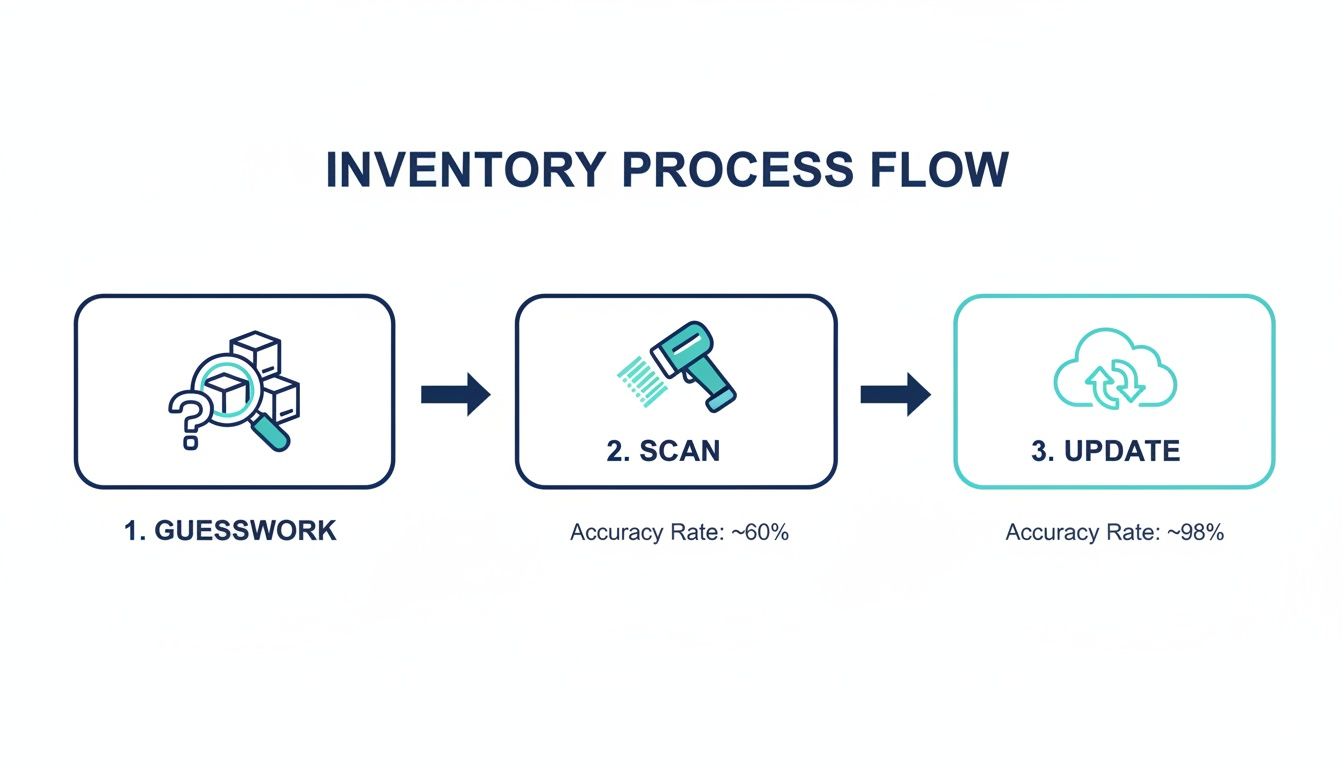
It’s a visual journey from uncertainty and manual effort to the speed and precision of digital scanning and cloud-based updates.
Smart Tags and Labels: Your Bridge to the Physical World
While digital tracking is great, a smart system also helps you organize your physical space. This is where QR codes and NFC (Near Field Communication) tags come into play. You can assign a unique QR code or NFC tag to a specific storage bin, a shelf, or a closet.
Here’s how it works in practice:
- Label a Container: Stick a QR code label on that storage bin in the attic labeled "Holiday Decorations."
- Link Your Items: In the app, you link all your holiday decoration items to that specific QR code.
- Scan to View: Next year, instead of opening the bin, you just scan the QR code with your phone. A complete list of its contents instantly pops up on your screen.
This creates a direct link between your digital list and your physical stuff. It ends the frustrating guesswork of rummaging through identical-looking boxes and helps you know exactly what’s stored where with a quick scan. NFC tags work the same way, you just tap your phone instead of scanning.
Natural Language Search: Your Personal Concierge
Finally, what good is a perfectly cataloged inventory if you can't find what you're looking for? This is where natural language search changes everything. It lets you interact with your inventory system like you're asking a person for help. Instead of typing a rigid keyword like "batteries," you can just ask, "Where did I put the spare AA batteries?"
The system understands your conversational question and searches your inventory to give you a precise location, like, "In the top drawer of the office desk." This makes finding things feel intuitive and fast, removing the need to remember exact item names or scroll through long lists. It’s the final piece of the puzzle that makes your inventory system feel less like a database and more like a genuinely helpful home assistant.
Real-World Benefits of an Organized Home
Let's look past the clever technology for a moment. The real magic of an automatic inventory management system happens in the small, everyday moments it completely changes. This is about more than a tidy pantry, it's about reclaiming your time, saving money, and finally bringing a sense of calm to your daily routine. An organized home is simply a less stressful home, and automation is the secret to getting there without all the constant effort.
Switching from a chaotic, reactive approach to a proactive, organized one pays off immediately. Imagine knowing exactly what you have before you head to the grocery store, or finding that specific screwdriver in seconds instead of digging through a junk drawer for ten minutes. These aren't just tiny conveniences; they add up, genuinely simplifying how you run your household.

Save Money by Preventing Waste
One of the first things you'll notice is the impact on your wallet. When you know exactly what’s in your fridge and pantry, complete with expiration dates, you stop throwing away food just because you forgot it existed. No more discovering a sealed block of cheese growing mold in the back of a drawer.
It also puts an end to accidental duplicate purchases. A quick check of your app while standing in the grocery aisle confirms you already have salsa at home, stopping you from buying a third jar you don't need. These little savings add up fast. For a wider look at how these systems create value, you can explore the true cost savings of automated inventory control.
Reclaim Your Valuable Time
Just think about all the time you waste searching for things. Whether it's the spare set of keys, the warranty for a new appliance, or your kid's favorite toy, those frantic minutes add up to hours of lost time and frustration every single month.
An automatic inventory system gives you that time back. With a simple search like, "Where are the extra HDMI cables?" you get an instant, precise location. This newfound efficiency goes beyond just finding things; it streamlines meal planning, packing for trips, and creating shopping lists.
"A well-organized inventory system can reduce the time spent locating household items by up to 90%, transforming frustrating searches into effortless finds."
This is the direct result of having a single, reliable source of truth for everything you own. What used to be a guessing game becomes a simple lookup.
Achieve Mental Peace and Reduce Stress
The mental load of running a household is real. That constant, low-level stress of trying to remember what you need, where you put things, and what’s about to run out is exhausting. An automated system offloads that entire mental burden.
Instead of keeping a running tally in your head, you can trust the system to do it for you. This clarity brings a powerful sense of control and calm. You’re no longer worried about running out of toilet paper unexpectedly or feeling overwhelmed by the sheer amount of stuff you own.
This shift isn't just happening in homes. The broader inventory optimization market, which fuels automatic inventory management, is projected to hit USD 12.42 billion by 2032. This growth shows a clear demand for platforms that provide precise control and reduce risks, like stockouts, which automation can cut by up to 50%.
Here’s how this peace of mind plays out in daily life:
- Effortless Meal Planning: Instantly see all your available ingredients to figure out dinner on the fly.
- Stress-Free Shopping: Your shopping list practically writes itself based on what you’re actually running low on.
- Quick Insurance Claims: If disaster strikes, you have a complete, documented list of your belongings ready to go.
Ultimately, automatic inventory management isn't about the items themselves. It's about the lifestyle it creates, one with less friction, less waste, and a lot more peace of mind.
A Simple Start to Your Automated Inventory
Jumping into automatic inventory management can feel like a massive project. I get it. The idea of cataloging every single thing you own is daunting. But the secret isn't to tackle everything at once. The real key is to start small and build momentum.
Instead of trying to inventory your entire home in one go, just pick one small, contained area. Make it your pilot project. This approach keeps the process from feeling overwhelming and gives you a quick, satisfying win that actually motivates you to keep going.
A perfect starting point is a space you use all the time, one that tends to get chaotic, like your pantry or medicine cabinet. These spots are usually filled with things that have clear expiration dates and need regular restocking, which makes them ideal candidates for automated tracking. By focusing on just one zone, you can learn the ins and outs of an inventory app like Vorby without the pressure.
Adding Your First Items with Ease
Once you've picked your starting zone, it’s time to add your first few items. This is where the magic of automation really starts to shine. Forget about tedious manual data entry; modern inventory apps make this step almost effortless.
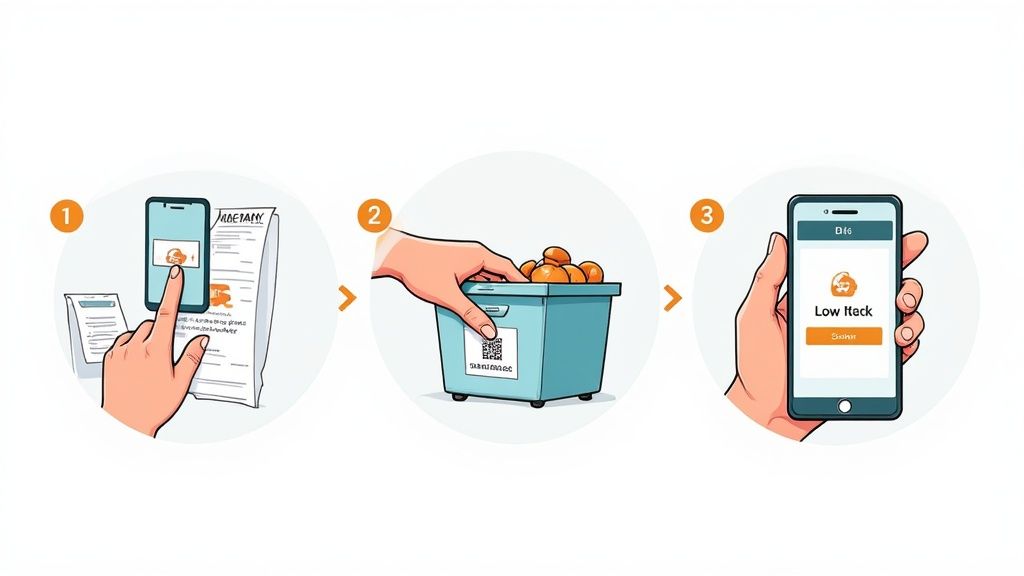
- Use Receipt Scanning: Just get back from the grocery store? Snap a quick photo of the receipt. The app will automatically read the text, identify each item you bought, and create a "new items" list for you to quickly assign to a location.
- Try Image Recognition: For items you already own, just take a picture. The app's AI can analyze the image, identify the product (like a bottle of ketchup or a box of crackers), and create an entry for you.
- Scan Barcodes: Nearly every product has a barcode. A quick scan with your phone’s camera is often the fastest way to pull up detailed product info and add it to your inventory.
Using these tools, you can populate your first inventory space in just a few minutes, turning a dreaded chore into a surprisingly simple task. This isn't just a niche household trend; it's part of a much bigger shift. In December 2025, the demand for inventory management automation systems shot up by 18% year-over-year, driven by a widespread need for greater efficiency. You can dig into more insights on this growing trend over at sparkco.ai.
Organizing for Practical Use
With your items logged, the next move is to make your digital inventory a perfect mirror of your physical space. This is what makes the system truly useful day-to-day. Start by creating logical "spaces" in the app that match your home, think "Kitchen," "Pantry," and then even sub-locations like "Top Shelf" or "Snack Drawer."
Next, assign each item you've added to its correct location. This simple step is what will eventually allow you to ask, "Where did I put the spare paper towels?" and get an instant, precise answer. It's also the perfect time to set up low-stock alerts. For essentials like coffee, toilet paper, or your favorite spices, set a minimum quantity. When you use an item and the count drops below that number, the app will automatically add it to your shopping list.
A consistent naming convention is your best friend. Decide now if you'll call it "Tylenol 500mg" or "Extra Strength Tylenol" and stick with it. This kind of consistency makes searching for items later on much more reliable.
Labeling for Long-Term Success
Finally, to make your system truly foolproof, use QR codes to label your storage bins and shelves. Most good inventory apps, including Vorby, can generate unique QR codes for any location you create. Just print them out on sticker paper and attach them to your containers.
This creates a powerful, tangible link between your physical stuff and your digital list. The next time you're wondering what’s in that mystery storage bin in the garage, you can just scan its QR code with your phone. A full list of its contents will pop up instantly, saving you the hassle of digging through it. It’s a simple but incredibly effective way to ensure your automatic inventory system is a powerful tool from day one.
Maintaining Your System for Long-Term Success
An automatic inventory system isn't a "set it and forget it" project. Its real magic kicks in when it becomes a seamless part of your daily life, not just another chore on your to-do list. The key is building simple, sustainable habits that keep your inventory accurate with almost zero extra effort.
Think of it as light, consistent maintenance that saves you from a massive, frustrating overhaul down the road. The goal is to weave these actions into your existing routines. When you get home from the store, scanning the receipt should be the first thing you do. When you use the last of the coffee beans, a quick tap in the app should feel as natural as tossing the empty bag.
Build Simple, Sustainable Habits
True long-term success comes from small, repeated actions that eventually become second nature. Instead of seeing inventory updates as a task, you want to tie them to moments that already exist in your day. This is how inventory management stops feeling like work and becomes an invisible, background process.
Here are a few powerful habits to get you started:
- The Post-Shopping Scan: The second you get home with your groceries, snap a photo of the receipt. Before you’ve even put the milk away, apps like Vorby can have it parsed, with all your new items ready to be assigned a spot. It takes about 30 seconds.
- Update at Depletion: The moment you finish something (the last scoop of protein powder, the final olive oil) update its status in the app. This one tiny action keeps your shopping list perfectly accurate and stops you from forgetting essentials.
- The Weekly Quick-Check: Set aside just five minutes a week, maybe right before you build your grocery list, to digitally "walk through" your pantry or fridge in the app. It’s the fastest way to catch anything you might have missed and keep your data fresh.
Make It a Team Effort
An inventory is only as reliable as its last update. And in a busy household, you're not the only one grabbing snacks or using up the toothpaste. This is why getting everyone on board is non-negotiable. A truly effective automated inventory system has to be a shared tool for the whole family.
Give your partner and older kids shared access. Empower them to contribute. When your spouse finishes the cereal or your teenager grabs the last granola bar, they can mark it in the app. This shared responsibility spreads the effort out and leads to far greater accuracy than one person trying to be the sole gatekeeper of a dozen different spaces.
A shared inventory system transforms individual actions into collective knowledge. Everyone contributes, and everyone benefits from knowing exactly what’s on hand, putting an end to household miscommunications and last-minute store runs.
Periodically Review and Adjust
Life changes. The things your family needed last year might not be a priority today. A great system is one that evolves with you, not one that locks you into old habits.
Set a calendar reminder for every few months to do a quick review. It’s not a full-blown audit, just a quick check-in. Ask yourself:
- Are Your Categories Still Working? Maybe you started a new hobby and need a "Craft Supplies" category, or you want to merge "Baking Goods" and "Spices."
- Are Your Alerts Still Relevant? Is that low-stock alert for the fancy flour you bought once still necessary, or can you adjust it?
- Does Your Digital Map Match Reality? If you reorganized the garage last month, take five minutes to update the locations and QR codes in your app.
This periodic fine-tuning is what keeps your system a perfect digital mirror of your home, ensuring it continues to save you time and slash stress for years to come.
Is My Data Safe and Private?
Let's talk about the elephant in the room. Any time you bring a new app into your home, especially one that knows what you own, questions about security are going to pop up. When you use an automatic inventory management system, you're trusting it with a lot of information. It's only natural to wonder how that data is being protected.
Honestly, a trustworthy app should treat your data with the same seriousness your bank does.
The first line of defense is encryption. Think of it as a digital lockbox. Reputable services encrypt your data both "in transit" (as it zips from your phone to the cloud) and "at rest" (while it's just sitting on a server). This process scrambles your information, making it completely unreadable to anyone who doesn't have the specific key. It’s the digital equivalent of a sealed, tamper-proof envelope.
So, What Information Are You Actually Collecting?
Transparency is everything, so let's be crystal clear about what an inventory app needs to collect and, just as importantly, what it doesn't. For the system to work, it has to know what you have. But it doesn't need to know who you are.
- What's collected: Item names (like "whole wheat bread"), how many you have, the locations you create ("Pantry, Top Shelf"), and maybe a purchase date.
- What's not collected: The system is designed to avoid collecting personally identifiable information (PII) beyond what's needed for your account, like an email address. Your inventory data is about your stuff, not you.
This focus on item data over personal data is a fundamental principle for a well-built system. Your inventory is your business, and yours alone.
You should always have complete ownership and control over your data. That means you have the right to see it, change it, and even download it all to take somewhere else, anytime you want. Your data should never be held hostage.
If you want to see exactly how your information is handled, a company should make it easy to find out. For a detailed look at Vorby's commitment to you, you can read our straightforward privacy policy. A clear, easy-to-read policy isn't just a legal document; it's a sign of respect for users, giving you the confidence you need to bring smart, secure technology into your home.
Got Questions? We’ve Got Answers.
Jumping into a new way of organizing your home always brings up a few last-minute questions. It’s completely normal. Getting those questions answered is the best way to feel confident you’re making the right move. Here are the things we hear most often from people just starting out with an automatic inventory management system.
We've kept the answers practical and straight to the point, no fluff. Think of this as your final checklist before you dive in and start taking control of your stuff.
How much time will this actually take to set up?
This is usually the first thing people ask, and for good reason. Nobody has time for a project that takes weeks.
The honest answer? The initial setup takes some effort, but it’s probably way less than you're imagining. If you start small, like with a single pantry or a medicine cabinet, you could have it fully cataloged in 20-30 minutes, especially using features like receipt scanning and image recognition.
The real magic, though, is the time you get back. That one-time investment of 30 minutes can save you hours every single month. No more frantic searches for the paprika, no more wasted trips to the store for something you already had, and way less stress when planning meals. It's a perfect example of a little work now for a huge payoff later.
Can my whole family use the app?
Absolutely. In fact, a home inventory is most powerful when it’s a shared tool, not just one person’s responsibility. An app like Vorby is designed for collaboration, allowing you to invite multiple family members into a shared inventory space, each with their own account.
You can also set different permission levels. For instance, you might give your partner full admin rights while letting the kids just view or update quantities. This way, everyone can help keep the inventory accurate. When your teenager finishes the cereal or your spouse uses the last of the milk, a quick update in the app keeps everyone on the same page. It’s a team effort.
When your inventory is shared, it becomes the single source of truth for the entire family. This simple feature can put an end to countless "who finished the...?" arguments and accidental double-buys at the grocery store.
What happens if I want to switch apps? Is my data trapped?
Your data should always be yours. Period. Any reputable inventory app will give you a straightforward way to export all your information. This usually comes in a standard file format like CSV (Comma-Separated Values), which is just a simple spreadsheet that can be opened by almost any program.
This means you’re never locked in. If you find another service you like better or even decide to go back to a manual spreadsheet, you can take your entire inventory list with you. That freedom is non-negotiable, you should always be in complete control of your own information.
Ready to stop searching and start organizing? With Vorby, you can build a complete, searchable map of your home. Try Vorby free for 14 days and see how it works for you.