
A QR code inventory system is your home's secret weapon against clutter. Think of it as a digital search engine for your physical stuff, turning chaotic spaces like the garage, attic, or storage unit into a database you can access right from your phone.
Instead of writing vague labels on a box ("Winter Stuff" or "Kitchen Misc"), you connect a physical container to a detailed, searchable list of everything inside it. This modern approach, powered by apps like Vorby, makes finding anything from holiday decorations to that one specific cable as simple as typing a word into a search bar.
What Is a QR Code Inventory System Anyway?

Imagine your home is a personal library, but without any system to find the books. You know you own that copy of your favorite novel (or your camping gear), but finding it means launching a frustrating, time-consuming hunt through every shelf. A QR code inventory system is the elegant solution to this age-old headache. It builds a bridge between your physical belongings and a digital record you control completely.
At its core, the system is simple: you assign a unique QR code to each storage bin, box, or even an individual large item. When you scan that code with your smartphone, it instantly opens a detailed list of everything linked to it. And this isn't just a basic note. A dedicated app can store photos, quantities, purchase dates, and even warranty information for every single item.
This method transforms every storage space, from the back of a closet to the highest shelf in the garage, into an organized, searchable part of your home. You no longer have to rely on a fuzzy memory or decipher your own messy handwriting on a dusty box.
The Power of a Simple Scan
The real magic here is in the speed and simplicity. A QR code system replaces pure guesswork with immediate, accurate information. Instead of physically opening five different containers to find one specific thing, a single scan reveals the contents without you having to move or unstack anything.
This technology has officially moved far beyond the warehouse. The global QR code market is projected to hit $13.04 billion by 2025, which just shows how widely it's being adopted for both business and personal use. This growth is fueled by how easy it is for anyone to use; with over 2.9 billion people expected to use QR codes regularly, the technology is more familiar than ever.
More Than Just a Fancy Barcode
It’s easy to think a QR code is just a cooler-looking barcode. While they serve a similar purpose, QR codes are way more powerful for home inventory. A traditional barcode might store a simple product number, but a QR code can link to a rich, dynamic, and updatable database.
This means you can:
- Store detailed descriptions of every single item in a container.
- Add photos so you can visually confirm what you're looking for.
- Link important documents like instruction manuals or receipts.
- Update the contents list anytime without ever needing to print a new label.
These codes act as digital doorways to everything you need to know about your stuff. By using them, you're essentially creating smart storage. You can learn more about how these digital labels work by reading our guide on what are asset tags and the role they play in getting organized. It’s all about helping you stop searching and start finding, giving you back countless hours and a whole lot of peace of mind.
Here’s the rewritten section, designed to match the tone and style of the provided examples.
So, How Does This Actually Work in Your House?
At its core, a QR code inventory system is a surprisingly simple idea. It’s all about building a bridge between your physical stuff, the boxes in the attic and the bins in the garage, and a digital list on your phone.
Picture a family finally deciding to tackle their cluttered garage. Instead of grabbing a marker and scribbling "Winter Stuff" on a plastic bin (a label that’s basically useless later), they decide to get smarter about it.
They pull out their phone, open an app like Vorby, and generate a unique QR code for that bin. They print it on a sticky label, slap it on the side, and then start building a digital list of what’s going inside. For every item they toss in, they add a quick entry, maybe even snapping a photo of that specific ski jacket or the kids' snow boots.
That tiny action changes everything. The box is no longer a mystery container. It’s now an indexed, searchable part of their home. Months later, when an unexpected cold snap hits, they don’t have to tear the garage apart guessing where their thermal gloves are. They just search "gloves" in the app, and it instantly points them to the exact bin.
It’s More Than a Label; It’s a Gateway
The real magic happens when you realize the QR code isn’t just a fancy label; it's a direct link. Your smartphone camera, a tool you use every day, becomes a powerful scanner that connects a physical object to a rich, detailed digital record you control completely.
This whole process gets rid of the mental gymnastics of trying to remember what you stored and where. Your brain can only hold so much information, but a digital inventory has a virtually unlimited memory. It won’t forget that you tucked away a specific set of holiday lights or the user manual for the patio furniture.
And this isn't some niche tech trend. Globally, QR code usage is expected to jump 22% by 2025, mostly because we all have smartphones. In 2023, nearly 45% of internet users between 16 and 64 scanned a QR code at least once a month. Big retail and logistics companies have seen this coming for years; their use of QR codes for tracking shot up 247% between 2021 and 2023. This detailed QR code statistics report shows just how powerful they are for inventory control, and now that same power is finally easy enough for anyone to use at home.
The Three Core Pieces of the Puzzle
To really get it, let's break down the key parts that make a QR code inventory system actually work for your house. It’s just a few simple tools working together.
- The QR Code Itself: Think of this as the unique fingerprint for each box or item. Unlike a regular barcode that holds a tiny bit of data, a QR code is a direct link to a full-blown record in your digital inventory.
- The Inventory App: This is your command center. An app like Vorby is where you create the codes, log your stuff, add photos or notes, and, most importantly, search for everything later.
- Your Smartphone: This is your scanner and your remote control. No need for clunky, expensive hardware. The device you already carry everywhere is all you need to scan codes and manage your entire inventory.
This setup turns what used to be a miserable chore into a quick, almost effortless process. Adding a new item to a box is as simple as scanning the code, typing a name, and hitting save.
A QR code system doesn't just help you organize what you have; it gives you the power to find anything you own in seconds. It’s about making your belongings work for you, not the other way around.
A Real-World Example
Let's go back to that family and their garage project. Here’s what their process looks like in real life, step-by-step.
- Generate and Label: They decide to tackle a box of old electronics. They open their inventory app, create a new "container" called "Garage Electronics Box," and the app spits out a brand-new QR code. They print it and stick it right on the box.
- Scan and Catalog: As they put an old video game console, a mess of charging cables, and a forgotten digital camera into the box, they scan the QR code. For each item, they add a new entry with photos and notes like "console works" or "needs a special adapter."
- Search and Find: A year later, a friend asks to borrow that exact game console. Instead of a frustrating, hour-long search, they just type "game console" into their app. The result immediately tells them it's in the "Garage Electronics Box," saving them a massive headache.
Setting Up Your System Step By Step
Diving into a QR code inventory system is way easier than it sounds. This section is your hands-on guide to turning that mountain of clutter into a clean, searchable database. We’ll use an app like Vorby as our home base and walk through the entire process, from start to finish. The goal is to make your home organization project not just doable, but maybe even a little fun.
Think of this as your personal workshop for building a smarter home. We'll cover everything from making your first codes to creating a scanning routine that actually sticks. Let's build a system that works for you, not one that gives you more chores.
Generating Your First QR Codes
First things first: you need to bring your digital tags into the physical world. The good news is that modern inventory apps do all the heavy lifting. Inside an app like Vorby, making a QR code is as simple as creating a new "box" or "item" in your digital inventory. The app instantly spits out a unique QR code tied directly to that entry.
You don't need any special software or tech skills. You can generate codes one-by-one as you pack a box, or print them out in big batches for a weekend organizing blitz. A lot of people find it helpful to print a whole sheet of unassigned codes so they have them ready to peel and stick whenever inspiration strikes.
This simple three-step process is all it takes to get started.
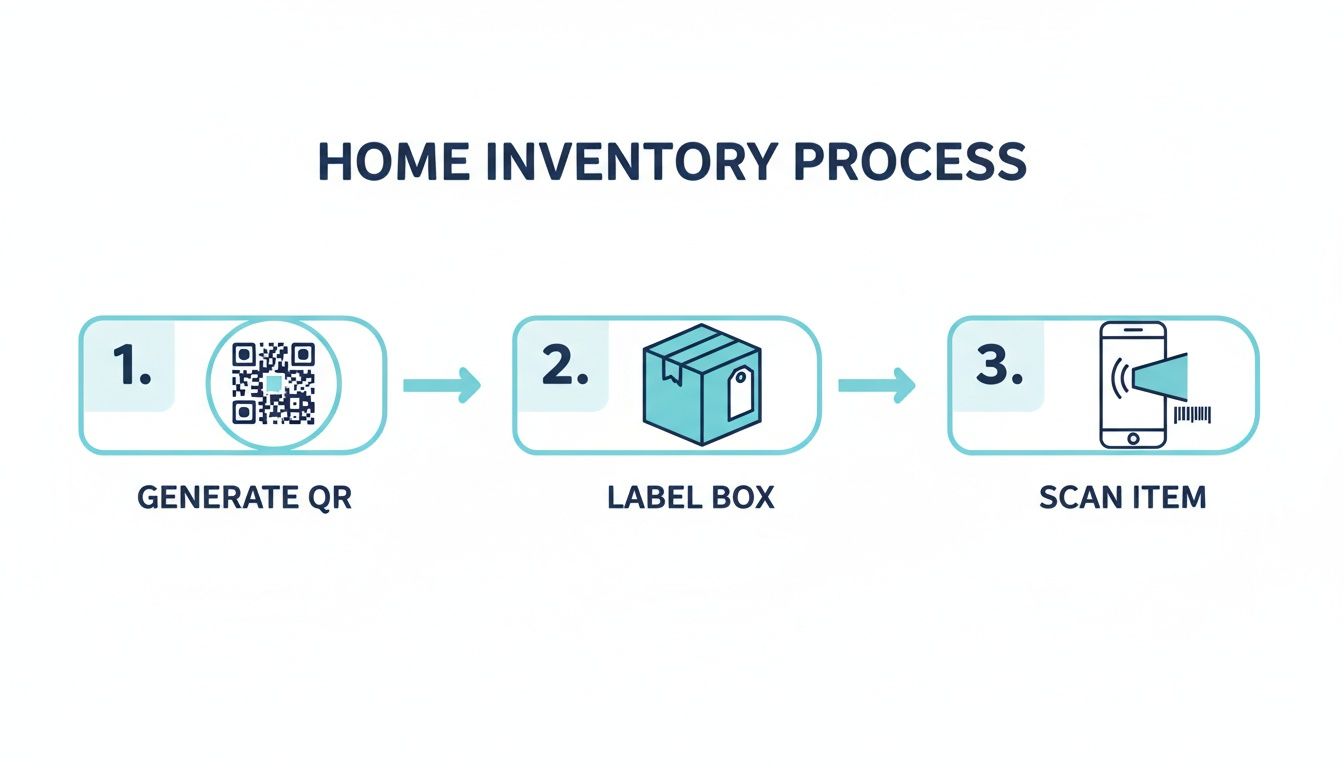
As you can see, the workflow is dead simple: generate the code, stick it on the container, and scan your stuff. That's the core of the whole system.
Choosing The Right Labels
The long-term success of your system really boils down to the quality of your labels. A paper label stuck on with a piece of tape probably won’t survive a year in a damp basement or a sweltering attic. When you're picking out labels, think hard about where your stuff will actually live.
- For Indoor, Climate-Controlled Areas: Standard adhesive paper labels from your home printer will do the trick for closets, pantries, and office cabinets.
- For Garages, Basements, or Attics: This is where you need to bring out the tough stuff. Go for waterproof and tear-resistant labels. Vinyl or polyester options are fantastic because they stand up to moisture, temperature swings, and grime.
- For High-Contact Items: If you're tagging something you handle all the time, like a tool case, think about using a laminated label or even a durable plastic tag to keep the QR code from getting scratched and faded.
Spending a few extra bucks on quality labels now will save you the massive headache of reprinting and replacing them later. After all, a code you can't scan is just a fancy sticker.
Smart Labeling Strategies
Okay, you've got your codes and your durable labels. Now, what do you actually tag? Do you put a QR code on every single item, or just the box they're in? The answer really depends on what you're storing. A good strategy saves time and makes your system a whole lot smarter.
The most effective QR code inventory system is the one you will actually use. Start simple by tagging containers first, and only move to individual item tagging for high-value or important belongings.
A balanced approach is usually the winner. For instance, you can use one QR code for a bin of "Winter Clothes" and just list everything inside (scarves, hats, gloves) in that single digital entry. But for something valuable like a camera or a power tool, giving it its own unique QR code is a smart move. This lets you track its warranty, purchase date, and specific model number all in one place. That kind of flexibility is a huge perk of using a modern qr code inventory system.
You can also get creative by integrating tools like low stock inventory identifier stickers for things you use up, like pantry items or craft supplies. They give you a quick visual cue that you're running low without even needing to scan.
Creating A Simple Scanning Workflow
Your inventory is only as good as the information you put into it. That’s why setting up a simple, repeatable routine for adding and removing items is so important. The trick is to make it a natural part of how you already handle your things.
- Adding New Items: When you toss something new into a storage box, take an extra ten seconds to scan the box's QR code and add the item to its digital list. Snap a quick photo while you're at it; your future self will thank you.
- Removing Items: When you take something out for good, whether you sell it, donate it, or trash it, do the same thing. Scan the code and delete the item from the list. This keeps your inventory from getting stale and inaccurate.
This small habit is what keeps your digital records from becoming a lie. Apps like Vorby make this process incredibly fast, turning a potential chore into a quick, satisfying task. You can learn more about generating and using QR codes with Vorby to see just how seamless it can be. By making scanning a consistent habit, you ensure your inventory remains a reliable map to everything you own.
Practical Uses for Every Room and Lifestyle
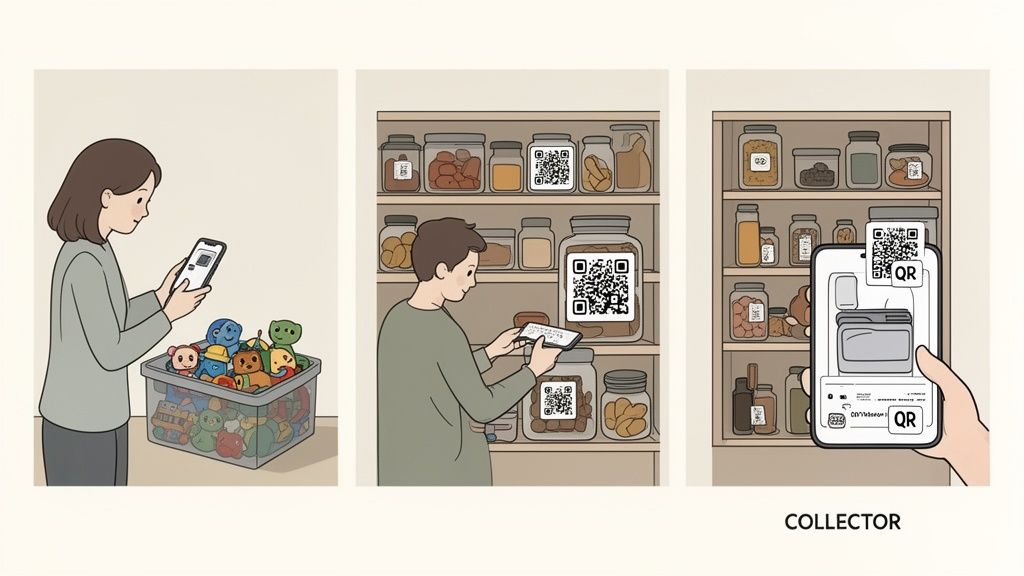
A QR code inventory system is so much more than a tool for a big move or a spring cleaning marathon. Think of it as a practical, everyday solution that tackles countless household headaches, adapting to your life and turning chaos into order, one scan at a time. The real magic happens when you see how it fits into every corner of your home and every kind of lifestyle.
For a busy family, it means instantly finding that one specific Lego set before a weekend project implodes. For a collector, it elevates a hobby into a meticulously documented passion, creating a digital log of an item's history and value which is perfect for insurance records. It’s all about getting your time back and shrinking the mental load of just managing your stuff.
For Busy Families and Parents
Let’s be honest, managing a family’s belongings can feel like a full-time job. A QR code system acts like your personal assistant, keeping track of everything from seasonal clothes to school supplies so you don't have to.
Picture this: your kid needs their rain boots, but you have no idea if they’re in the garage, the hall closet, or a mystery bin in the basement. Instead of a frantic 15-minute search, you open an app like Vorby and use its natural language search. Just ask, "where are the rain boots?" and get an instant, exact location. That one feature transforms a stressful moment into a calm, efficient one.
This level of organization goes way beyond just finding things. It helps manage shared items and spaces, too.
- Toy Rotation and Storage: Tag bins of toys with QR codes. When it’s time to swap them out, a quick scan tells you exactly what’s inside, making the process faster and meltdown-free.
- Seasonal Clothing Swaps: Label bins for each season and family member. You’ll never again have to rip open ten boxes just to find one specific winter coat.
- School and Craft Supplies: Keep tabs on art supplies, old school projects, and extra notebooks with a simple scan, which means no more buying duplicates.
For Collectors and Hobbyists
If you're a collector, your items are more than just things; they're investments loaded with history and value. A QR code inventory system gives each piece the detailed attention it deserves by creating a comprehensive digital archive.
You can link a single QR code to a record that contains:
- Purchase date and price.
- High-resolution photos showing its condition.
- Digital copies of receipts or certificates of authenticity.
- Notes on its backstory or personal significance.
This creates an invaluable resource for insurance claims, potential sales, or just for your own enjoyment. A well-organized collection is easier to manage, protect, and appreciate. For a deeper dive on this, check out our guide to creating a tagging system for inventory.
A QR code system isn’t just about knowing where something is; it’s about preserving the story and value of every important item you own. It provides peace of mind that goes far beyond simple organization.
For Roommates and Shared Households
Living with other people has its challenges, especially when it comes to shared supplies and common areas. A shared inventory system can put an end to arguments over who bought the last roll of paper towels or where the spare lightbulbs went. With an app that supports multiple users, everyone stays on the same page.
For roommates, real-time sync prevents disputes. This is becoming more important as 60% of US consumers now see QR technology as a permanent part of their lives. There’s a huge financial benefit, too; misplaced items cost Americans $2.7 billion each year in replacement costs, a number that a solid system can dramatically cut down. You can see more insights about these QR code statistics and their growing impact. By creating a shared digital inventory for kitchen supplies or cleaning products, everyone can see what’s in stock and contribute fairly.
Keeping Your Inventory Accurate and Useful

An organization system is only as good as the information inside it. A QR code inventory system is powerful, but its real value comes from keeping it alive. The goal is to build a few simple habits that ensure your digital records stay accurate for years, turning that initial setup effort into a long-term asset you can actually trust.
Think of it this way: your digital inventory should be a "single source of truth" for everything you own. If it gets outdated, it becomes useless. The key is to make updates a natural part of your routine, not some massive chore you dread.
Building a Routine for New Purchases
The easiest way to keep your inventory current is to catalog new items the moment they enter your home. This is the classic "one-touch" rule of organizing. Before you stash that new power tool or kitchen gadget, take an extra minute to log it.
Here’s a simple workflow to make it stick:
- Designate an "Intake" Spot: Pick a place, a countertop or a shelf in the garage, where all new storable items land first. No exceptions.
- Scan and Add: Before the item goes to its final home, scan the QR code on the box or shelf where it will live.
- Capture the Details: Add the item to your app, snap a quick photo, and upload the receipt if you have it.
This tiny habit prevents a backlog of uncatalogued stuff from piling up and ensures your inventory grows accurately right alongside your possessions.
Handling Items You No Longer Own
Just as important as adding new things is removing old ones. When you sell, donate, or toss an item, your digital inventory needs to know. Otherwise, you’ll find yourself searching for something that isn’t there anymore, which completely erodes trust in your system.
Create a clear "outflow" process. The moment an item leaves your home for good, scan its container's QR code and delete it from the digital list. It’s a simple step that keeps your records clean and prevents your app from getting clogged with ghost items.
An accurate inventory isn’t just about knowing what you have; it’s also about knowing what you don’t have. Regular updates are crucial for maintaining a system that reflects reality.
The Importance of a Quick Annual Audit
Even with the best habits, things can get missed. That’s why a quick annual spot-check is so important. This isn't a massive, weekend-long project. Just plan to audit one specific area once a year, like the attic or the garage.
During your audit, just scan a few boxes at random and compare the digital list to what’s actually inside. This helps you catch any mistakes, update item conditions, and confirm everything is where it’s supposed to be. This small time investment ensures your qr code inventory system remains a tool you can rely on, no questions asked.
Managing Label Damage and Shared Inventories
Life happens. Labels get torn, smudged, or fade over time. To ensure your QR codes are always scannable and durable, it helps to follow a good printing quality control checklist from the start. If a code ever becomes unreadable, just generate and print a new one from your app and swap it out.
For families or roommates, use an app like Vorby that supports shared inventories. This lets everyone add, update, and find items, which is the only way to keep the system current when multiple people are involved. This is where dynamic QR codes really shine, since they can be edited and tracked. In fact, studies show dynamic codes can boost scan rates by 48% over static ones, a huge advantage for long-term accuracy.
Answering Your Top Questions
Jumping into a new way of organizing your home always brings up a few questions. That's totally normal. Think of this section as a quick chat to clear up the most common curiosities about using a QR code inventory system, so you can get started with complete confidence.
Let's tackle those "what ifs" and make sure you have all the info you need.
How Secure Is My Inventory Data?
Handing over a detailed list of your belongings to an app can feel like a big step, so wondering about security is smart. Reputable inventory apps like Vorby are built with your privacy as the absolute top priority. Your data isn't just sitting out in the open on a server somewhere; it's wrapped in multiple layers of security.
The most important layer is data encryption. Think of it like a digital armored car. When your data travels from your phone to the server (in transit) and while it's stored there (at rest), it's scrambled into an unreadable code. Only you, with your secure login, have the key. This means even in the highly unlikely event of a breach, your personal inventory remains private and unreadable to prying eyes.
Do I Need A Special Scanner Or Printer?
This is one of the best parts: you already own all the "special equipment" you'll ever need. You can forget about those bulky, expensive barcode scanners you see in warehouses.
Your smartphone is the scanner. The same camera you use for family photos and vacation videos is perfectly capable of reading QR codes in a split second. Modern inventory apps are designed to work seamlessly with the phone already in your pocket, which is what makes this system so perfect for home use.
When it's time to print your QR labels, you have a couple of fantastic options.
- Your Home Printer: The easiest and most direct method is using the inkjet or laser printer you already have. Just grab some standard adhesive sticker paper (like the Avery labels you can find anywhere), and you can print out sheets of QR codes in minutes. It's fast, simple, and requires zero new hardware.
- A Dedicated Label Maker: If you want a more permanent and professional-looking solution, a dedicated thermal label maker is a brilliant little investment. These printers create tough, long-lasting labels that are often waterproof and won't smudge, making them perfect for storage bins in the garage, attic, or basement where conditions aren't always perfect.
The right choice just depends on where the box will live. For a closet indoors, standard paper labels work just fine. For anything that might face moisture, friction, or temperature swings, investing in a good label maker is a move you won't regret.
Why Not Just Use Notes Or Photos On My Phone?
It’s a fair question. You could definitely snap photos of a box’s contents or keep a list in a notes app. Honestly, that's how a lot of people start. But that approach begins to break down the second you have more than a handful of boxes to track. It’s like trying to navigate a new city with a crumpled, hand-drawn map instead of a GPS. It might work for a block or two, but it’s incredibly inefficient.
A dedicated QR code inventory system offers a massive advantage that a simple photo or note just can't touch: searchability.
With an app like Vorby, you can type "hiking boots" and instantly see they're in Box #14, on the top shelf of the garage, in the back-left corner. Now imagine trying to find that same information by scrolling through thousands of photos on your camera roll or scanning dozens of separate, unstructured notes. It’s a frustrating, time-sucking nightmare.
Beyond search, a real system gives you structure. You can attach crucial details that a photo alone can't capture:
- Purchase dates and warranty info for your electronics.
- Digital copies of receipts and manuals so you're never scrambling.
- Item quantities, conditions, and specific notes for collections or valuables.
Ultimately, a QR code system lets you see everything inside a container without ever having to open it. It transforms your storage from a collection of mystery boxes into a smart, searchable database, saving you from that endless cycle of unpacking and repacking just to find one single thing.
Ready to stop searching and start finding? Vorby transforms your home into an organized, searchable space. Generate QR codes, catalog your belongings with AI, and find anything you own in seconds. Start your free trial today and see how easy home inventory can be.