Barcode inventory tracking isn't just for warehouses anymore. It's a surprisingly simple system that uses scannable codes to digitally log and manage your stuff, turning your phone into a seriously powerful organizational tool. This is the same tech businesses have used for decades, but now it's easy enough for anyone to set up at home to organize storage, track a collection, or just get a handle on household supplies.
The End of Lost Items: Why You Need a Home Inventory System
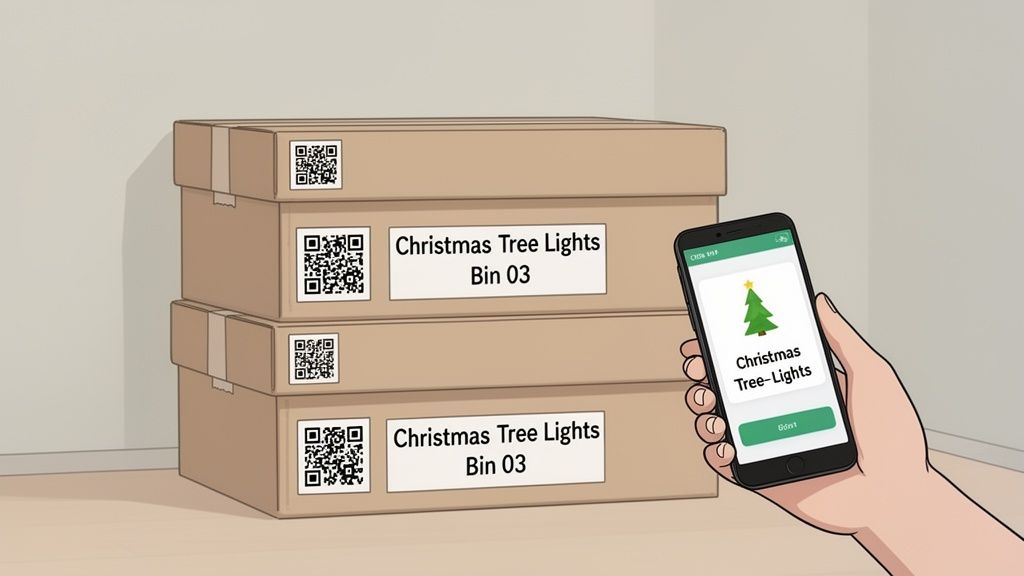
Imagine knowing exactly where your seasonal decorations, important documents, or that one specific tool is with just a quick scan of your phone. That’s the simple promise of bringing professional-grade inventory management into your home. The days of chaotic, handwritten lists or just guessing what’s inside a storage bin are officially over.
For too long, this level of organization felt out of reach, exclusive to giant retail stores. Today, it’s a game-changer for busy families, dedicated collectors, and anyone who's just tired of the endless search for misplaced items. A simple QR code on a box can create a digital map of your possessions, making life significantly more organized and way less stressful.
Transforming Clutter Into Clarity
The real magic of a barcode inventory tracking system is the shift from physical searching to digital finding. Instead of tearing open five different boxes to find your holiday lights, you can just search for "lights" in an app like Vorby and instantly see its location: "Garage, Shelf C, Bin 04." This is a lifesaver for all those things you only pull out once or twice a year.
Here's how it makes a real difference at home:
- Instant Identification: Scan a box’s QR code to see a full list of its contents without ever lifting the lid.
- Effortless Searching: Find any item in your home using a simple keyword search on your phone or computer.
- Reduced Stress: Eliminate that familiar frustration and wasted time that comes with hunting for misplaced things.
- Better Organization: Create a logical, structured system for all your stored goods, from family keepsakes to workshop tools.
Accuracy You Can Actually Rely On
Perhaps the biggest impact of barcode inventory tracking is the dramatic leap in accuracy. Manual data entry is notoriously error-prone, producing roughly one mistake for every 300 keystrokes. Barcode scanning, on the other hand, drops that error rate to less than one in 3,000,000 scans, a massive boost in reliability.
Organizations using barcodes can hit an inventory accuracy of about 99%. That’s a huge jump from the 63% accuracy common with old-school manual methods.
A home inventory system doesn't just tell you what you have; it tells you where it is. It turns every closet, shelf, and storage bin into a searchable, digital extension of your memory.
While barcode systems are incredibly powerful for items in storage, you might also want to explore other tools for tracking valuable items that you move around frequently. The ultimate goal is to build a system that works for your life, creating a streamlined and searchable home.
Getting Your Toolkit Ready for a Smooth Setup
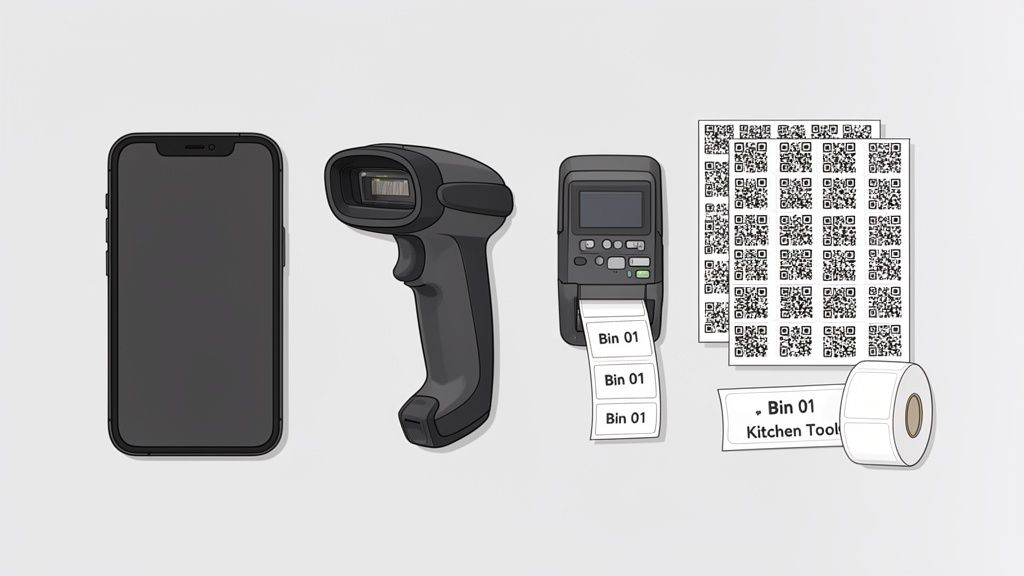
Before you can start tagging your life, you need to pull together a small but mighty toolkit. The best part? You probably already own the most important piece of gear: your smartphone. Modern inventory apps like Vorby are designed to turn your phone’s camera into a surprisingly fast and accurate scanner for barcodes and QR codes.
For most home projects, your phone is genuinely all you need. It’s powerful enough to handle everything from the kitchen pantry to the garage. However, if you're taking on a truly massive project, like cataloging a huge collection or a packed-to-the-gills storage unit, a dedicated handheld scanner might be worth it. These devices are built for one thing: rapid, repetitive scanning that can save you a ton of time. If that sounds like you, our detailed guide can help you choose the right barcode scanner for inventory management.
Choosing the Right Tag for Your Items
Next up, you have to decide what kind of scannable tags you'll actually stick on your stuff. You've got a few solid options, and the best choice really boils down to what you're labeling and how much information you need.
Here’s a quick rundown to help you decide which tag is the best fit for your home inventory needs.
| Tag Type | Best For | Pros | Cons |
|---|---|---|---|
| QR Codes | The all-around winner for most home use: boxes, bins, and individual items. | Stores lots of data, readable even when slightly damaged, easy to create with apps. | Can be slightly larger than 1D barcodes, may look cluttered on tiny items. |
| 1D Barcodes | Simple item identification, like tools or books, where you only need a unique number. | Very fast to scan, familiar format, takes up minimal space on a label. | Holds very little information, can become unreadable if scratched or smudged. |
| NFC Tags | High-value or frequently accessed items where a quick "tap" is more convenient than scanning. | Incredibly fast and convenient, no camera needed, can be hidden from view. | More expensive per tag, requires your phone to be physically close. |
For the vast majority of home inventory projects, QR codes are the gold standard. They hit the sweet spot between data capacity, durability, and ease of use, especially when your inventory app can generate them for you on the fly.
Picking Your Printer and Labels
Once you've settled on a tag type, you’ll need a way to print them. Don't worry, you don’t need to buy a fancy commercial printer. Your standard home inkjet or laser printer is more than capable of creating durable, scannable labels.
The real key is pairing your printer with the right kind of label sheets. Look for quality adhesive label paper from brands like Avery, which offers dozens of sizes. A sheet with 30 labels (like the common Avery 5160 template) is a fantastic starting point. The labels are big enough to scan easily but small enough to fit on most boxes, bins, and larger items.
If you’re tagging items headed for a damp basement or dusty garage, it's smart to spring for weatherproof or polyester labels. They’re built to resist moisture and tearing, making sure your codes stay scannable for years to come.
Pro Tip: Before you print an entire sheet, do a test print on a regular piece of paper. Hold it up against your label sheet in front of a light. This simple check ensures your alignment is perfect and can save you from wasting a whole sheet of expensive labels.
Designing Your Personal Home Inventory Blueprint
A great inventory system starts with a plan, not a scanner. Before you print a single label, taking a few minutes to design a logical structure for your inventory is the single most important thing you can do. This is your blueprint. It’s what ensures your system is intuitive, scalable, and actually helps you find things in under 30 seconds.
Think of it like creating a digital map of your home. The goal is to establish a clear hierarchy that mirrors your physical space. Without this step, you risk creating a digital mess that's just as frustrating as a cluttered closet.
Success is built on consistency. Start by creating standardized names for every single area and location in your home.
Establish Clear Naming Conventions
The backbone of an organized inventory is a consistent naming scheme. Instead of vague descriptions like "storage," you need specific, predictable names for every place you stash your stuff. This eliminates the guesswork and makes searching for items ridiculously fast.
Your naming convention should be simple enough to remember but detailed enough to be useful. For instance, instead of just "Garage," break it down into logical zones.
- Areas: These are the broad zones of your home (e.g.,
Garage,Basement,Attic,Office Closet). - Locations: This is specific furniture or fixtures within an Area (e.g.,
Metal Shelving,Wooden Cabinet,Under Stairs Storage). - Sub-Locations: Think individual shelves, drawers, or sections within a Location (e.g.,
Shelf A,Shelf B,Top Drawer).
This simple structure creates a crystal-clear path to any item. A quick search for holiday decorations would instantly point you to Attic > West Wall > Bin 07, a far more useful result than "somewhere in the attic." When you get going, a well-chosen inventory software with barcode support will make creating and managing these custom locations a breeze.
Create a Logical Location Hierarchy
Once you have your names down, the next step is building a hierarchy. This is how you digitally connect your Areas, Locations, and Containers (like boxes or bins). A solid hierarchy is what allows your inventory app to understand the relationship between different places and items.
The real power of a location hierarchy is turning a simple search into a precise directive. You're not just finding an item; you're finding its exact spot on a specific shelf in a particular room.
A typical hierarchy might look something like this:Basement > Storage Room > Metal Shelving > Shelf C > Bin 04
This level of detail is what makes a home inventory system genuinely powerful. When you scan the QR code on "Bin 04," your app immediately knows its exact location. If you decide to move that bin to the garage, you just update its location once, and every single item inside is digitally relocated right along with it.
Categorize Your Items Thoughtfully
Finally, think about how you want to categorize the items themselves. This layer of organization goes beyond physical location and helps you group similar things for easier management. Are you a collector tracking vintage toys? Categories like Action Figures, Board Games, and Comic Books would be non-negotiable.
For most household organization, your categories might be a bit broader:
Tools & HardwareHoliday DecorationsCamping GearCraft SuppliesImportant Documents
This upfront planning is what separates a temporary fix from a lasting organizational solution. By defining your spaces, creating a hierarchy, and categorizing your items before you start scanning, you build a robust blueprint that makes managing your possessions almost effortless.
Putting Your Plan Into Action: Tagging and Scanning
You've got your organizational blueprint. Now for the fun part: bringing it to life. This is where your digital plan meets your physical stuff, turning those ideas about organization into a functional, scannable reality. The process itself is surprisingly simple; it's all about generating your codes, tagging your containers, and then logging what's inside each one.
The first big tagging session can feel like a project, I get it. But think of it as a one-time investment that will pay dividends for years to come. Don't try to tackle the whole house at once. Start small. Pick a single shelf or one messy closet to get the hang of it. Using an app like Vorby, you can generate an entire sheet of unique QR codes with just a couple of taps. Print them on your label paper, and you're officially ready to roll.
The whole idea of barcode inventory tracking started in retail, but it didn't take long for warehouses, libraries, and factories to see the genius in it. The Universal Product Code (UPC) was standardized way back in 1973, and the first-ever retail barcode scan happened at an Ohio supermarket in June 1974. Today, those humble barcodes are scanned over 10 billion times every single day. That same battle-tested infrastructure, which includes the standards, the scanner tech, and the decades of reliability, is what powers the system you're about to build in your own home.
The Core Workflow: Tagging and Associating Items
Your main workflow will boil down to a simple, repeatable pattern: stick a label on a container, scan it with your phone, and then add its contents to the app.
Let’s walk through it. Say you’re finally organizing that big bin of holiday decorations. First, peel off one of your freshly printed QR code labels and stick it onto a flat, visible surface of the box.
Next, open your inventory app and scan the code you just attached. The app will instantly recognize it as a new, unassigned container. This is where you give it a name, something obvious like "Holiday Lights Bin", and then assign it to the location you mapped out earlier, like Attic > West Wall.
That's it. You've just created a permanent digital link between the physical box and its virtual record. The infographic below shows how these individual containers fit into your larger home inventory blueprint.
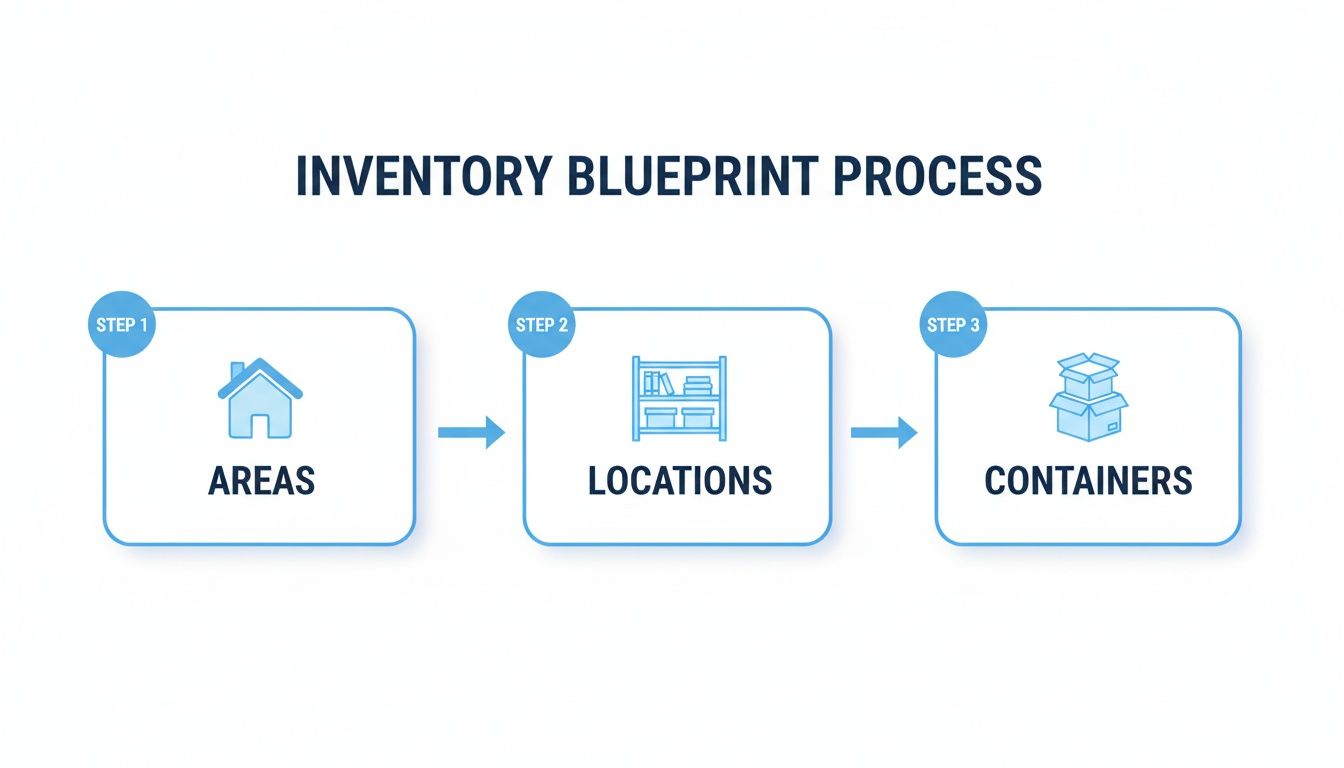
This structure is what makes the system so powerful. Everything flows logically from broad Areas (like the Attic) down to specific Locations (the West Wall) and finally to your individual Containers (the bin itself).
Filling Your Digital Containers
With the container created in your system, the last step is simply listing what's inside. You don't need to write a novel here; just add the items as you pack them.
For our holiday box, your digital list might look something like this:
- Christmas Tree Lights (3 strands)
- Outdoor String Lights (Blue, 2 strands)
- Extension Cords (2)
- Replacement Bulbs
Now, fast-forward to next year. When you're wondering where the lights are, you can just scan that box’s QR code and this exact list will pop up on your phone. No more guessing, no more dragging down three heavy boxes just to find the one you need. This is the heart of a truly useful barcode inventory tracking system.
The real win isn't just knowing a box contains "decorations." It's knowing it contains exactly three strands of tree lights and two extension cords before you even bring it down from the attic.
If you’re adding a bunch of similar items at once, look for a bulk-add feature in your app. It’s a huge time-saver that lets you add multiple items to a container’s list in one shot.
As you bring new things home, the process gets even easier. Just add the new item to an existing container with a quick scan and a few taps. This is how inventory management shifts from being a massive project to a minor, satisfying daily habit. You can learn more about fine-tuning your process by reading our guide on barcode scanning for inventory management. This simple routine is the key to keeping your home perfectly organized for good.
Keeping Your Home Inventory System Accurate Over Time
Getting your home inventory system set up is a huge win, but the real magic happens when you keep it accurate over the long haul. A barcode inventory tracking system is only as good as the data you put into it. The good news? Maintenance isn't some massive chore. It's really just about building a few small, simple habits that keep your digital and physical worlds in sync.
The biggest hurdle is just remembering to update the system as things change. You move a box from the garage to the basement, use up the last of the batteries from a bin, or toss a new purchase into an existing container. Each of these moments is a tiny crack where inaccuracy can creep in. The key is to make scanning and updating part of the activity itself, not a separate task you have to remember later on.
Simple Routines for Lasting Accuracy
Consistency is your best friend here. By weaving a few quick actions into your everyday routines, you can maintain a flawless inventory with surprisingly little effort. Think of it less like a project and more like a series of quick, satisfying check-ins.
Here are a few practices that have worked wonders for me:
- Update on the Move: If you move a box from the attic to the basement for the winter, scan its QR code and update its location in the app right then and there. It takes about 15 seconds and saves you from a "where did I put that?" headache later.
- Log It When You Use It: When you grab the last of the craft supplies from a bin, scan the container and tap to remove the item from its digital list. This is how you avoid thinking you have things you've already used up.
- Handle Empty Containers: Once a bin is empty, you have a couple of options. You can either archive it in your system to reuse the QR code later or just mark it as "Empty." This prevents "ghost" items from cluttering up your inventory searches.
Adopting a lifecycle mindset can also be incredibly helpful. This idea is borrowed from the business world, where they follow the principles of IT Asset Lifecycle Management to track equipment from purchase to disposal. Applying that same logic at home means you're thinking about an item from the moment it enters your house until the day you sell, donate, or trash it.
Troubleshooting Common Scanning Issues
Even with the best system in place, you’ll eventually hit a minor snag. A code won't scan, or you'll realize you logged something in the wrong location. Don't sweat it, these issues are almost always an easy fix.
If a barcode or QR code is being stubborn, run through this quick checklist before you get frustrated.
Pro Tip: QR codes have built-in error correction, which means they can often be read even if a small part of the label is scuffed, torn, or smudged. This makes them way more resilient for long-term storage in rough-and-tumble spots like a garage or basement.
Here’s what to check if a scan fails:
- Check for Smudges or Damage: The most common culprit is just a dirty label. A quick wipe with a dry cloth or your sleeve is often all it takes. If a label is badly torn, just print a new one from your app and slap it on.
- Adjust Lighting and Distance: Too much glare from an overhead light or a dark, shadowy corner can make it tough for your phone's camera to focus. Try changing your angle, moving the item to a better-lit area, or adjusting how far your phone is from the code.
- Correcting a Mistake: Realize you accidentally logged that box of old cables in the "Kitchen Pantry" location? No problem. Just find the item in your app, edit its location, and your system is instantly corrected. It's that simple.
Common Questions About Home Inventory Systems
As you start looking into barcode inventory tracking, a few questions are bound to pop up. It’s a big leap, moving from cluttered shelves to a perfectly organized, scannable system, but it’s a whole lot simpler than you might think. Let's tackle some of the most common questions people have when they're on the verge of setting up their own home inventory.
The great news? The tools you need are probably already in your pocket. You can get professional-level organization without dropping a ton of cash on specialized hardware.
Do I Need to Buy an Expensive Barcode Scanner?
Absolutely not. For pretty much any home inventory project you can dream up, your smartphone is the perfect tool for the job. Modern apps like Vorby are built to use your phone's camera, turning it into an instant and surprisingly accurate scanner for QR codes and barcodes.
This approach doesn't just save you money. More importantly, it means your scanner is always with you when you need it.
Dedicated scanners really only make sense in high-volume, commercial settings where every single second counts. For organizing a garage, attic, or a prized collection, your phone is more than powerful enough to get it done.
What Is the Difference Between a Barcode and a QR Code?
While both get the job done for tracking, QR codes are generally the better choice for home inventory. A traditional 1D barcode, the kind you see on a can of soup, holds a tiny bit of information, usually just a simple product number. That’s great for retail, but not so useful for a custom system at home.
A 2D QR code, on the other hand, can hold a ton more data. It can store a completely unique ID that points directly to a specific box in your attic, which is far more practical. They're also super easy to generate for free within apps like Vorby and can be scanned reliably even if the label gets a little scuffed up over time.
A standard barcode is like a book's title, while a QR code is like its entire summary. For home inventory, having that extra detail at a glance makes all the difference.
How Much Time Does This Really Take to Set Up?
Honestly, it depends on how much stuff you have. But here's the secret: don't try to do it all at once. The old "eat the elephant one bite at a time" approach works wonders here. Just start with one contained area, like your garage workshop or that one closet you're afraid to open.
Carving out a weekend afternoon to fully organize and tag a single space is a fantastic start. Once the system is in place, maintenance is incredibly quick. We're talking just a few seconds to scan a new item or update a box's location as you go about your day.
Do I Have to Rescan Everything if I Use an Item?
Nope, not at all. A good inventory app is designed to make this painless. You don't need to rescan the entire box every time you take something out.
Instead, you simply open the container's digital record (either by scanning its QR code or just searching for it) and update the contents list. You can remove the specific item you used, and the digital inventory for that box is instantly updated. It’s a simple process that makes keeping your inventory accurate both easy and fast.
Ready to stop searching and start finding? Vorby gives you all the tools you need to create a powerful, scannable home inventory system. Generate QR codes, track locations, and find anything you own in seconds. Start your free trial today and discover a more organized home.