The moment you want to know where something is, your hands are usually full. So the Vorby iPhone app teaches Siri to answer out loud, without opening anything: ask where an item is, or what a room holds, and Siri says the answer and shows a small card.
Before you start
- You need the Vorby iPhone app, signed in, with your items synced at least once. Siri answers from the copy of your inventory on the phone.
- Say Vorby in the phrase. That is how Siri knows the question is for us rather than for something else on your phone.
- Spoken phrases are in English for now. The answers Vorby speaks are translated, but the phrases you say are not yet.
Where is my ...?
Ask for anything in your inventory by name. All of these work:
- “Hey Siri, where is my passport in Vorby?”
- “Hey Siri, where’s my drill in Vorby?”
- “Hey Siri, find my winter coat in Vorby.”
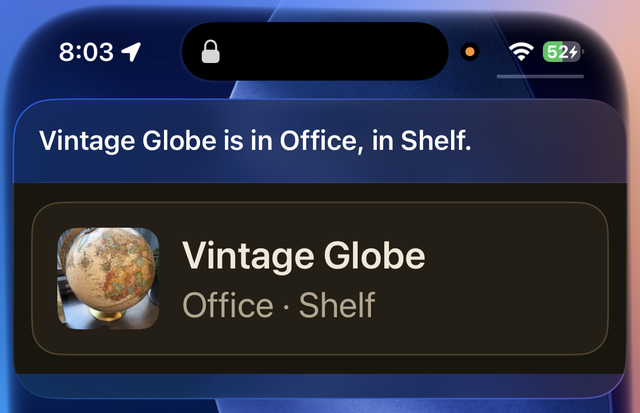
Siri answers with the room and the exact spot, if you recorded one: “Passport is in Office, in Filing cabinet.” The card shows the item’s photo. The app stays closed.
What’s in my ...?
Ask about a room instead of an item and Siri reads back a count and a few examples: “There are 14 things in Garage, including Cordless Drill, Extension Cord and Paint Tray.” The card lists up to eight, with a count of anything left over.
- “Hey Siri, what’s in my garage in Vorby?”
- “Hey Siri, show me my pantry in Vorby.”
Open an item hands-on
When you do want the full record, with the photo, the receipt and the warranty, say “Hey Siri, open my drill in Vorby” and the app opens straight to that item.
What Siri says when it is unsure
- Two things with the same name? Siri asks which one, and tells them apart by where they live.
- Nothing matched? You hear that the item is not in your inventory, which is different from Siri telling you the phone has no inventory yet, so you always know which of the two happened.
- Just added something in the app? Ask about it right away. Vorby refreshes what Siri listens for after every sync.